Wedding Planning, and the Ones You Don't
The Wedding Planning Tools You Actually Need (and the Ones You Don't)
You need far fewer wedding planning tools than the internet suggests: a connected guest list and RSVPs, a budget you trust, a seating chart, a website and a checklist. The honest toolkit, and what to skip.
By Elise Schofield
· 12 min read
Six tools. That's the whole list, and probably far fewer than the sixteen tabs you've likely got open at 11pm scrolling through "must have" wedding apps that promise to change your life. You need somewhere to keep your guest list and RSVPs, a budget you actually trust, a seating chart that talks to both of those, a wedding website, a checklist with a timeline attached, and a way to compare vendors side by side.
Let's go through each one, because "you need it" isn't very useful without knowing why.
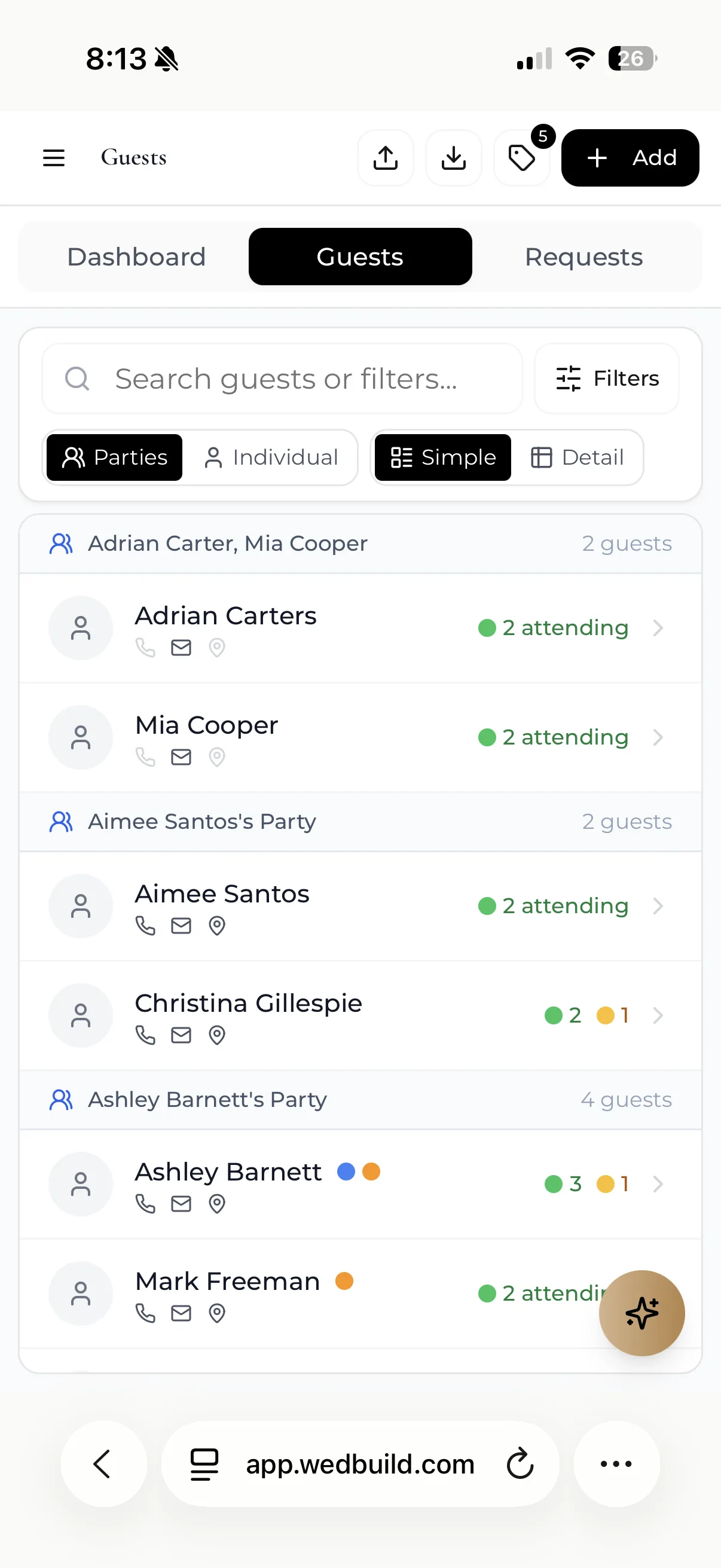
Guest List and RSVP Manager
This is the spine of your whole wedding. Every other decision, catering numbers, seating, budget per head, invitation count, hangs off this one list.
The job it does: keeps names, addresses, meal choices, plus-ones, and RSVP status in one spot that updates as people respond.
When you need it: the second you start telling people you're engaged, honestly, because Auntie Denise will ask if she's invited before you've even picked a date. Speaking of Auntie Denise, she once asked my cousin if she could bring "a plus-one" to a wedding she herself wasn't invited to yet. Some people plan their outfits before you've planned your ceremony.
What happens without it: you end up with a guest count that's different depending on which conversation you're remembering, a caterer asking for final numbers you can't confirm, and a seating chart built on vibes rather than facts. I've seen couples find out they under-catered by fourteen people three days out, and that's not a fun phone call to make.
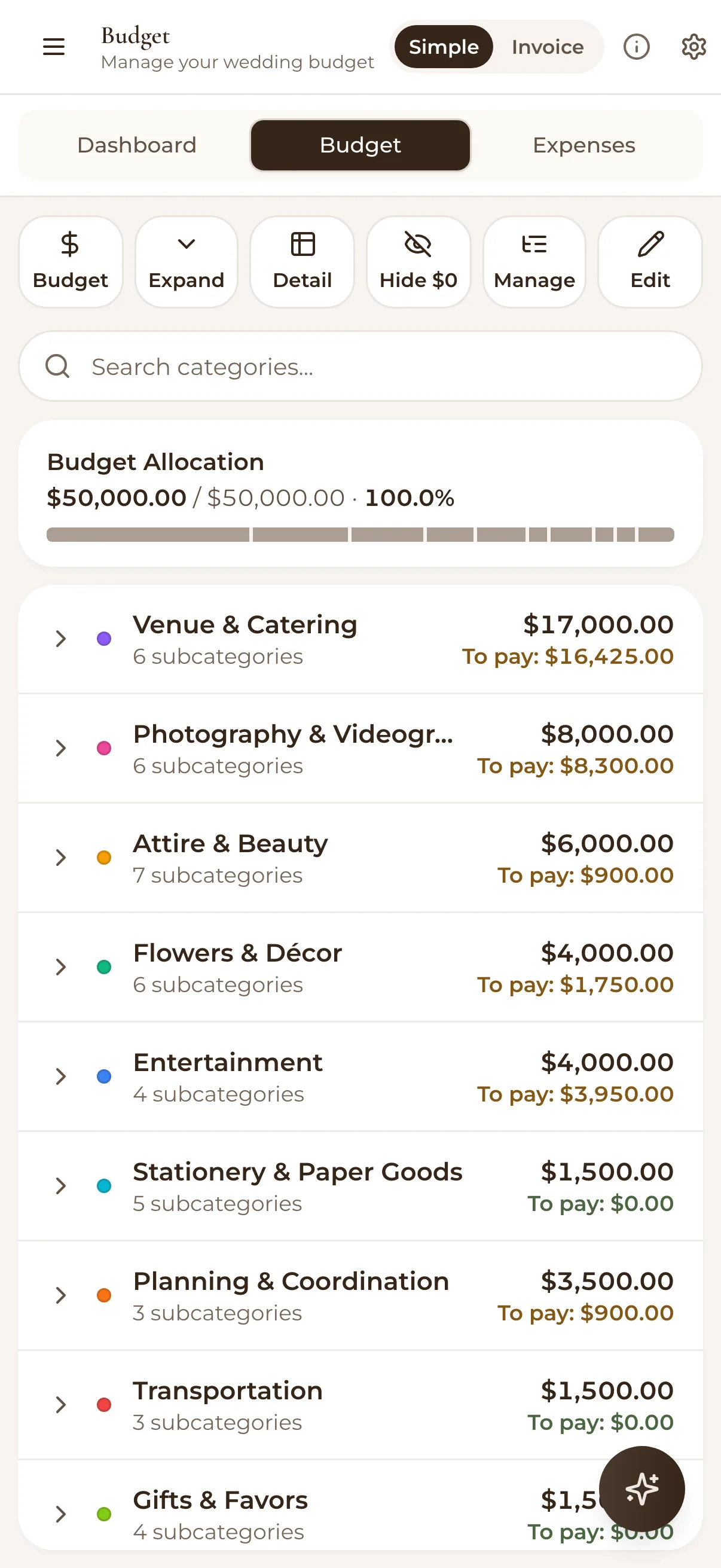
A Budget You Trust
A living budget, updated constantly, rather than one you made once in January and then ignored.
The job: tracks what you planned to spend, what you've actually spent, and what's still sitting out there waiting to surprise you (hello, alterations).
When you need it: before you book anything, with budget first and venue second, always.
Without it: you find out your dream venue ate 60% of your total spend and now the flowers are getting whatever's left, which in most cases is "not much" and "please just use greenery." A wedding budget without tracking is like a leaky bucket at a well: you keep pouring money in, and you're still somehow thirsty by the reception.
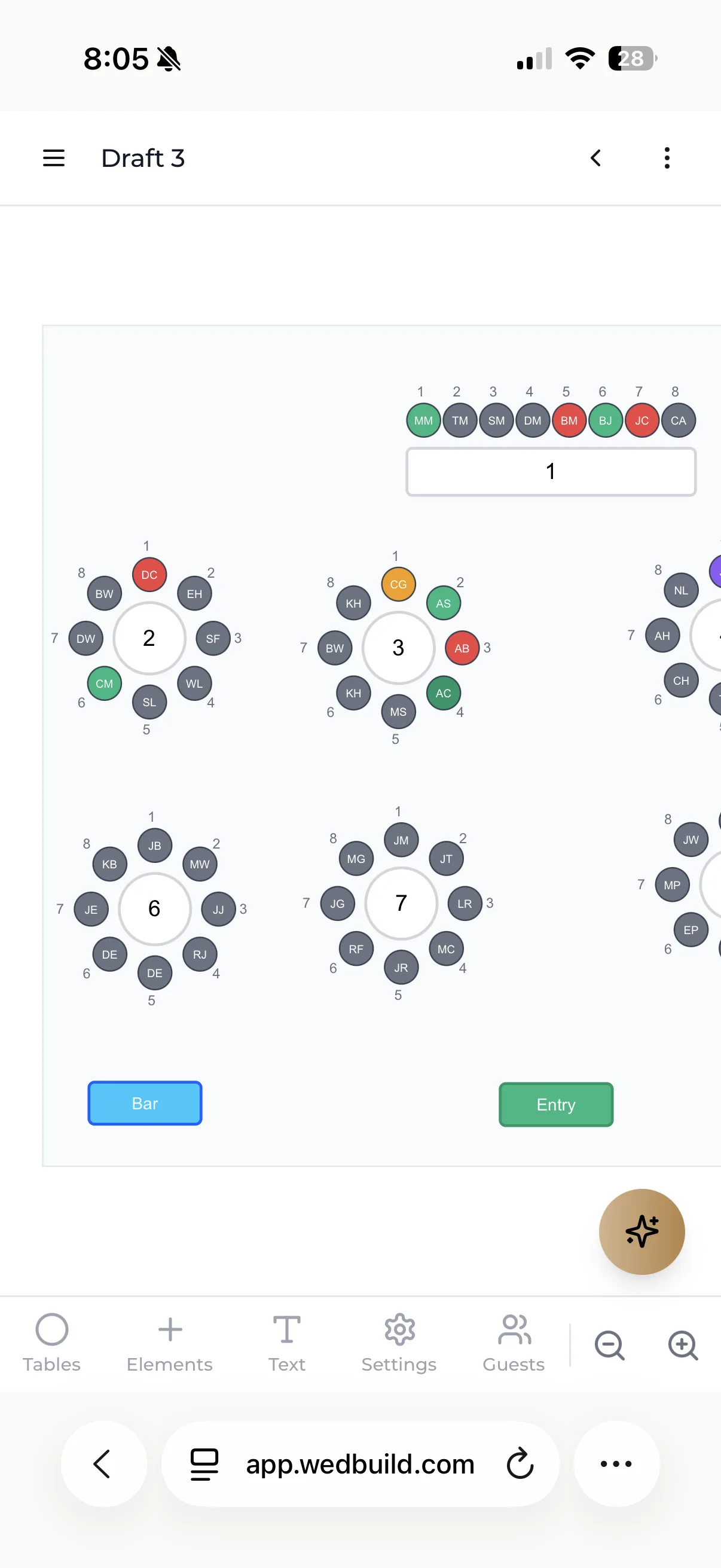
Seating Chart, Connected to the Guest List
Here's where I see the most tears, and rarely the happy kind. Couples build a seating chart in one tool, then update their guest list in another, and by the time Cousin Mark cancels, nobody remembers to move his seat. Table 9 sits there empty like a monument to poor admin.
The job: turns your live guest list into a physical (or digital) floor plan.
When you need it: once RSVPs start rolling in, not the week before.
So skipping this step means last-minute chaos, awkward family diplomacy conducted via sticky notes, and at least one relative seated next to their ex out of pure oversight.
Quick one for you: Why did the seating chart go to therapy? Because it had too many unresolved tables.
Wedding Website
Think of it as your wedding's customer service department, one that answers the questions so you don't have to answer them nineteen times over text.
The job: houses your date, location, registry links, RSVP form, dress code, and the FAQ nobody reads but everyone needs.
When you need it: as soon as you've locked in a date and venue.
Skip it, and you become the wedding website. Every question, "is there parking," "can I bring my kids," "what's the dress code," lands in your inbox personally, and congratulations, that's now your part-time job.
Checklist With a Timeline
An actual sequence, this by month four, that by month eight, rather than a vague list of "book florist" sitting there with no date attached.
The job: tells you what to do and, more importantly, when to do it, so nothing gets left until the panic zone.
When you need it: day one, genuinely, since the earlier the better.
Skip it, and you book the photographer in week one because you were excited, then remember six months later you never sorted the marriage certificate paperwork, which, depending on where you live, has its own deadlines that don't care about your excitement levels.
A Way to Compare Vendors
Caterers, photographers, celebrants, florists: they all send quotes in different formats, at different times, using different jargon for basically the same service.
The job: lets you see quotes, contracts, and availability side by side so you're comparing apples to apples, not apples to a PDF from 2019.
When you need it: the moment you start reaching out to more than one vendor for the same job, which, let's be honest, should be every job.
Skip it, and you pick whoever emailed back fastest, and hope for the best. Sometimes that works out, but often it means you missed that the "cheaper" caterer doesn't include staff, and now you're serving canapés yourselves in your wedding dress.
The Tools You Can Skip
Now for the fun part: the stuff you don't need, no matter how convincing the App Store description sounds.
Registry aggregators. Most retailers already let you build and share a registry directly. Adding a third-party layer just means another login, another place your gift list can get out of sync, and another app update notification cluttering your phone in June.
Fifteen inspiration apps. One mood board is a tool, while fifteen is a hobby, and not always a healthy one. Pick a single spot for saving ideas, Pinterest board, a folder, whatever, and stop there. The point of inspiration is to make decisions, not to keep generating more options until you're paralysed by florals.
Office project-management software. I get the appeal. You're an efficient person who's used Asana or Trello at work, so why not for the wedding? A wedding isn't a product launch, and it isn't a sprint either. Nobody needs a Kanban board with a column called "Blocked" for their seating chart, since these tools are built for teams tracking dozens of moving projects, not two people trying to remember if the cake tasting is Tuesday or Thursday. It's a screwdriver doing a hammer's job, technically possible but mostly just awkward.
The Connection Principle
Here's the actual truth hiding underneath all of this: which tools you pick matters far less than whether they talk to each other.
I want to say that again, because it's the whole point of this article. The tools matter less than the connections between them, and planning breaks down at the seams, not the tools themselves.
Think about what happens with five disconnected tools. Your guest list lives in one app, while your seating chart lives in a separate program you exported from six weeks ago. Your budget is a standalone thing you check every so often, unrelated to whoever RSVP'd yes or no this week, and your wedding website has its own guest data too, entered separately, because apparently nothing was willing to sync with anything else.
Now Cousin Mark cancels. You update the guest list, but the seating chart doesn't know, the budget doesn't adjust the catering estimate, and the website RSVP count doesn't change either. You're now the manual sync between five separate systems, doing data entry as a hobby, unpaid, unpaid, unpaid.
This is where most wedding stress actually comes from, and it's rarely mentioned in the glossy checklists. The big decisions, venue, dress, cake flavour, aren't usually what grind people down. It's re-entering the same twelve pieces of information into five different places, over and over, for eight months straight, and that's the actual cost, time and sanity, spent on admin nobody sees.
Fewer tools that are actually connected fix this: one that shares guest data across the RSVP list, the seating chart, and the website, so an update in one place shows up everywhere else automatically. You enter Cousin Mark's cancellation once, and everything downstream just knows.
How to Choose
Before you adopt any tool, wedding-specific or otherwise, ask these questions, less as a checklist to tick off blindly, more as a filter to save you from your own excitement at 11pm on the App Store.
Does it connect to the other tools you're already using, or does it live on an island? A tool that can't share data with your guest list or budget is asking you to do double the admin for half the benefit.
Does it solve a problem you actually have, or a problem the marketing copy convinced you that you have? Be honest here: "AI-powered mood board generator" sounds impressive, but you almost certainly don't need it.
Can you cancel it easily if it turns out to be useless? Some tools lock you into annual plans for a one-day event, which is like buying a gym membership for a marathon you're running once.
Will you and your partner actually both use it? A tool that only one of you opens isn't a shared system, more of a diary, and doesn't need to be an app for that.
Best Setup for Most Australian Couples
Best if your wedding is under 50 guests: a free all-in-one plan plus a shared calendar. You genuinely do not need more, and paying for tools at that size is how the budget starts leaking before you have booked anything.
Best if you have meal choices, dietary needs or seating politics: one connected platform covering guest list, RSVPs, seating and budget. The moment those four have to agree with each other, separate tools cost you more time than they save.
Best if you are still hunting for venues and vendors: an Australian vendor directory alongside your planning tool. They do different jobs and pairing them is normal.
How WedBuild Covers the Connected Set
The connection principle above is the whole reason WedBuild exists. Six separate tools that each do one job well still leave you as the integration layer, retyping the same guest into a guest list, an RSVP sheet, a seating chart and a catering email.
In WedBuild the guest list, RSVPs, budget, seating chart, checklist, vendor comparison and wedding website are one system rather than seven that sync. An RSVP updates the guest list, which updates the seating chart, which prints the table cards with the dietary legend. That is the tool set from this article, minus the integration work.
The numbers, in AUD: free for weddings up to 50 guests, including the guest list, wedding website, online RSVPs and checklist. Standard is A$99 paid once and removes the guest limit, adding the budget planner and drag-and-drop seating. Pro is A$199 paid once and adds the visual room designer, QR Find My Seat and vendor comparison. One-time payments, never a subscription, which also answers the cancel-it-easily question above. WedBuild is built in Australia.
Before you go
Frequently asked questions
Do I need a wedding planning app?
Not necessarily an app specifically, but you need the functions one provides: a connected guest list, budget, and timeline. Whether that comes from one app or a few connected ones is up to you, and what matters is that the information isn't scattered.
Can I plan a wedding with just a spreadsheet?
You can, plenty of people have, but a spreadsheet doesn't update your seating chart when someone RSVPs "no" at the last minute, and it won't notify your florist that the timeline moved. It's a static record, useful for tracking, less useful for the moving parts.
When should I start using planning tools?
The day you set a date, honestly, with guest list and budget first, seating chart and website once the venue's locked in, and vendor comparison as soon as you start requesting quotes. Waiting until "closer to the date" just means cramming eight months of admin into eight weeks, and nobody wants that version of engaged life.
If you want the short version of this whole article: pick tools that talk to each other. That principle is why we built WedBuild as one connected platform: guest list, RSVPs, budget, seating chart, website and checklist in a single flow, free to start for up to 50 guests, with the budget and seating tools in a one-time paid plan (never a subscription). And if you are weighing up whether to pay for anything at all, our honest free vs paid comparison covers exactly that.
What is the best all-in-one wedding planning app for Australian couples?
The one whose guest list, RSVPs, seating and budget are the same system rather than four that export to each other. WedBuild is built that way and priced in AUD (free for up to 50 guests, with seating, the budget and unlimited guests from A$99 once), but the honest answer depends on what you need: we compared the field, including the US platforms, in our wedding planning apps in Australia comparison.
Is there a free wedding planning app worth using?
Several. Just check where the paywall sits before you enter 120 guests, not after. WedBuild's free plan covers weddings up to 50 guests with the guest list, wedding website, online RSVPs and checklist, and every new couple gets seven days of the Pro tools free. The budget planner, seating chart and unlimited guests come with Standard, A$99 paid once, so there is nothing to cancel after the wedding.

Written by
Elise Schofield
Co-founder, WedBuild
Elise is the co-founder of WedBuild and a newlywed who knows exactly what it’s like to be buried in wedding spreadsheets. Frustrated with outdated websites and messy planning tools, she helped build WedBuild so couples can plan their weddings with less chaos and more “this actually feels fun".