WedBuild Planner — for wedding planners
Every client wedding, in one calm place.
Wedding planner software that runs your whole book. Every wedding you manage gets the complete WedBuild toolkit — guest list, budget, seating, run sheet, website — and your couples get a home they'll love.
You'll set your workspace up first and choose your plan inside WedBuild, once you've had a proper look around — nothing you click here locks you to a tier. We ask for a card at signup and don't charge it until day 15. Cancel any time before then and you won't pay a thing.
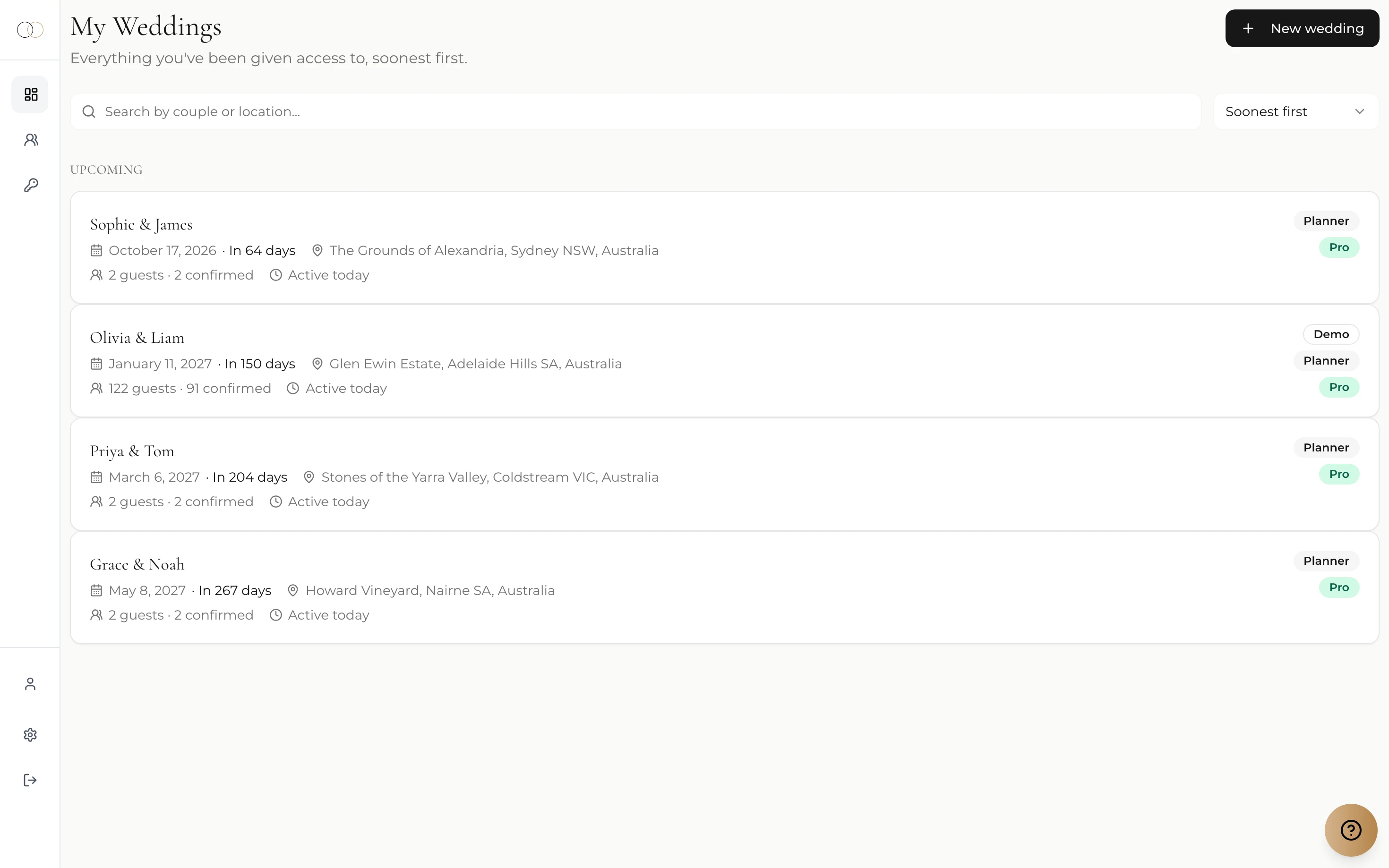
Running several weddings at once usually means running several systems at once: a spreadsheet per client, a shared drive of run sheets, five tabs of logins, and couples texting for updates because nothing they can open shows the current state of their own wedding.
WedBuild Planner replaces the lot with one workspace. Your weddings live side by side on one screen — dates, guest counts, RSVPs, who's been active — and each one opens into the full WedBuild toolkit, the same tools couples already use to plan their own day. Nothing to export, reconcile or re-type.
And because it's the couple's home too, handing them their wedding — during the engagement or after the last dance — is one click, not a file transfer.
Run the whole book from one workspace
Open a wedding, get the whole toolkit
Step into any client wedding and you're in a complete planning suite for that couple: guest list, budget with invoices and payments, checklist, vendors, seating, website, run sheet, RSVPs and email campaigns. Every wedding on your plan runs on the full Pro toolkit — unlimited guests included, no per-wedding upgrades.
See every tool in the suite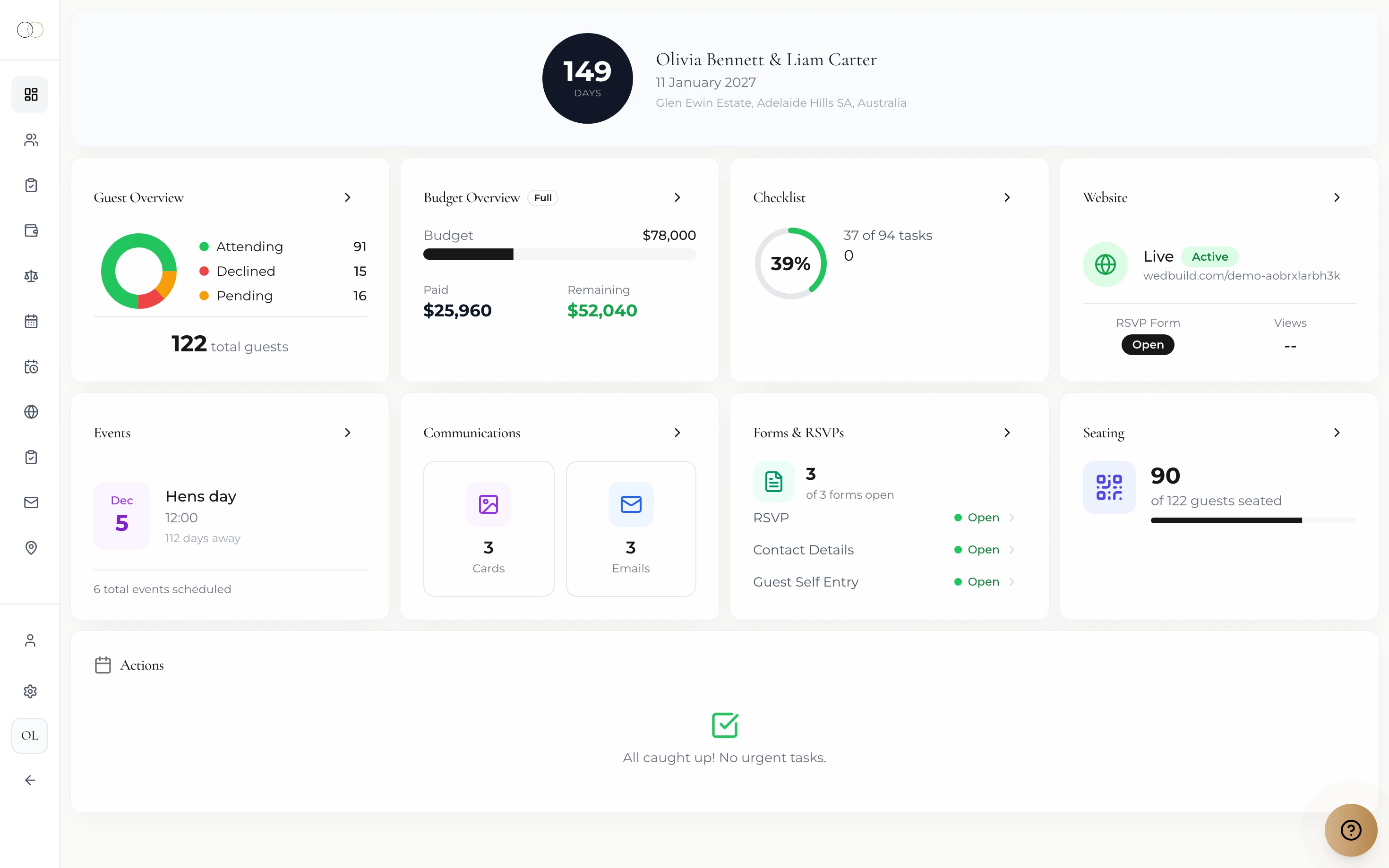
Run the day from the same place
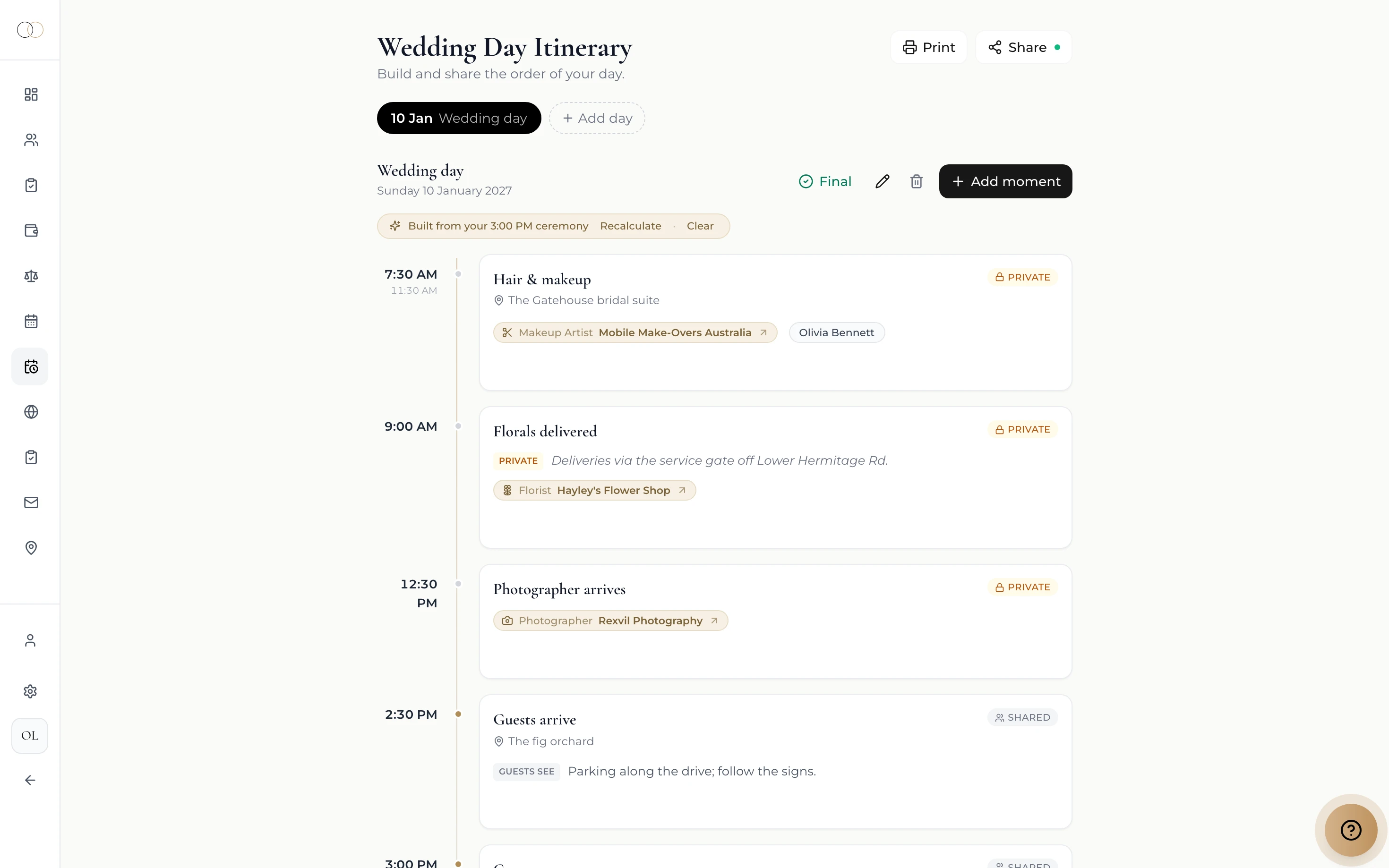
Build the run sheet moment by moment — hair and makeup to sparkler farewell — with a name against everything that has to happen. Publish it as a clean, phone-friendly page for the couple, MC and vendors (password optional), while the seating chart, dietary report and QR Find My Seat read from the same live data on the day.
Bring your team — billing stays yours
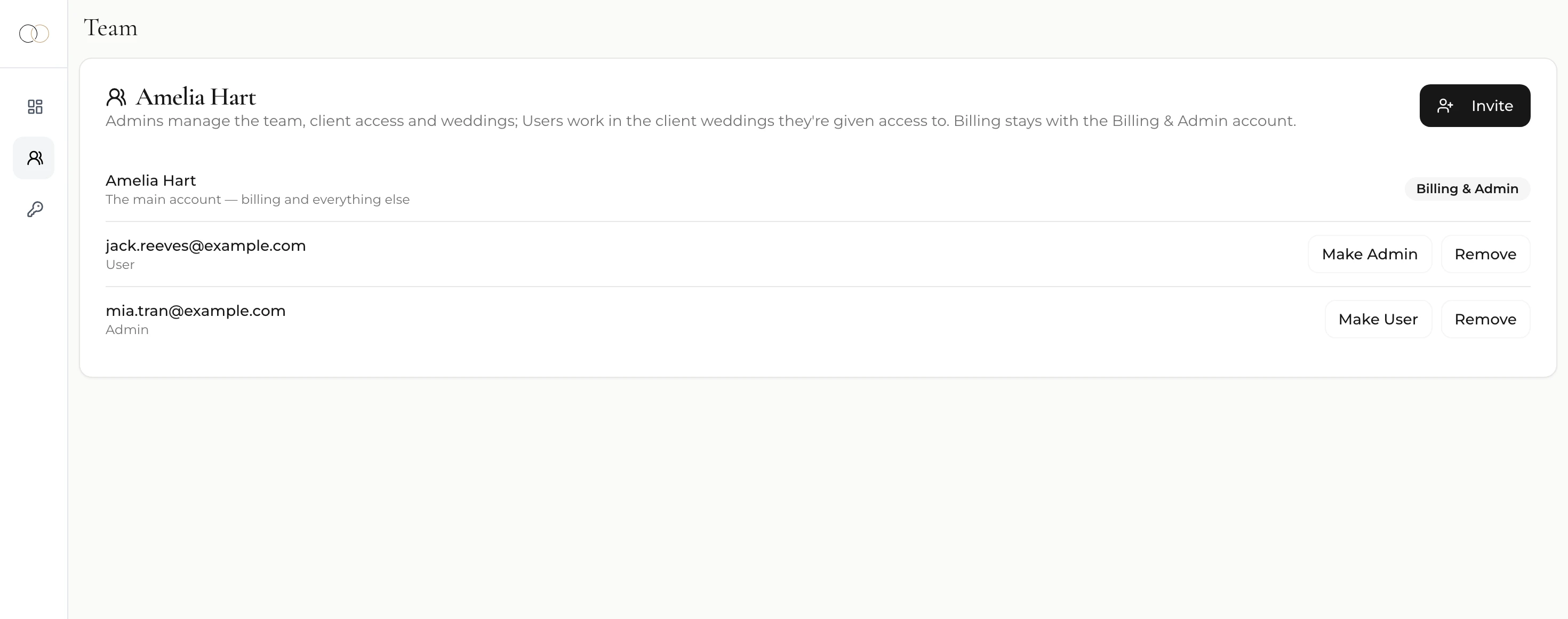
Teammates get their own logins under your subscription. Admins run the business with you — everything but billing — while Users work only in the client weddings you assign them, with access changes applying from their very next page load. One subscription, one invoice, your whole practice.
Couples join in, vendors see just enough
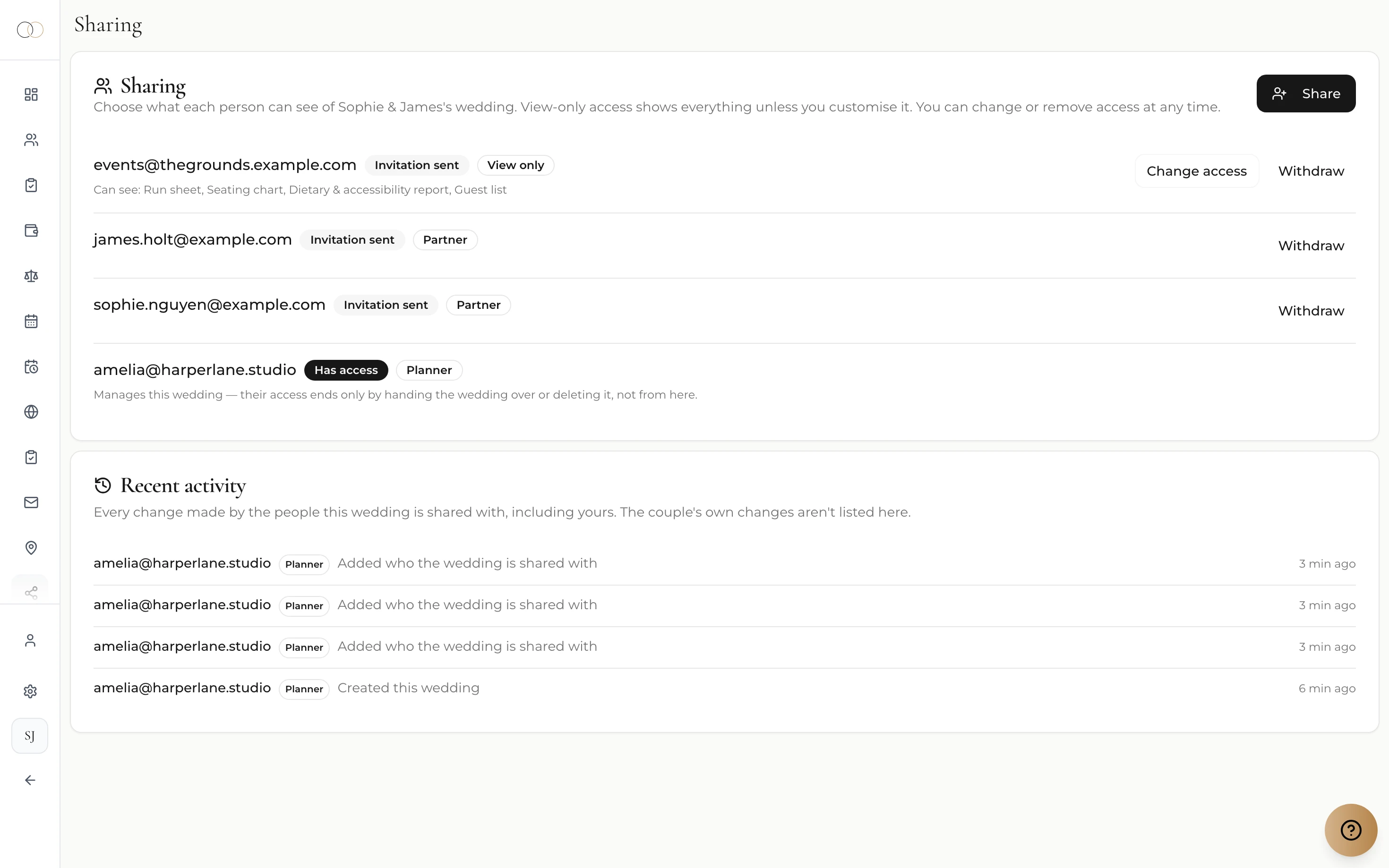
Start a wedding before the couple has an account, then invite them in as full partners whenever you're ready — they see their real wedding, live, instead of asking you for updates. Venues, celebrants and vendors can get read-only access to exactly what you tick — run sheet, seating chart, dietary report, guest list — and you can see who's opened what.
Start inside a finished wedding
Every planner account opens with a fully planned demo wedding: 120 guests, a $78,000 budget with real invoices and payments, a 94-task checklist, seating charts, a published website and a 15-moment run sheet. Poke around a wedding that's already built — then create your first client wedding knowing exactly how yours will come together. It never counts toward your plan.
The full toolkit, on every wedding
The same tools couples love, under your management — every client wedding on your plan gets all of them.
Dashboard
The whole wedding on one screen — numbers, progress, what needs you.
Guest list
Households, dietaries, plus-ones — every yes, no and maybe.
Budget
Categories, invoices and payments — where every dollar sits.
Seating
Drag-and-drop charts, a visual room designer and QR Find My Seat.
Run sheet
The day-of timeline, moment by moment, shareable with everyone who needs it.
Wedding website
A beautiful site with RSVPs built in, live in an afternoon.
RSVPs & forms
Custom questions, multi-event invites, responses that file themselves.
Invites & announcements
Design beautiful cards and send tracked email campaigns.
Vendor comparison
Shortlists, quotes and scoring — decisions without the fatigue.
Checklist
Every task with owners and due dates, so nothing slips.
How it works
Create your workspace
Sign up as a planner in minutes. Your workspace arrives with the demo wedding already planned, so you can explore before anything is real.
Add a client wedding
The couple's names, the venue, a date if you have one — that's it. Invite the couple now with their email, or later when you're ready.
Run it to the day
Budget, guests, seating, run sheet — with your team beside you and vendors reading from the same page. When the job wraps, hand the wedding to the couple.
WedBuild Planner pricing
Four sizes, one toolkit — pick the cap that fits your book and change it as the book grows. Billed monthly, cancel any time.
Solo
Up to 5 weddings
AUD per month
A tight book, run beautifully — the whole toolkit for an independent planner.
Start free trialStudio
Up to 15 weddings
AUD per month
Room for a full season and a teammate or two, without changing how you work.
Start free trialAgency
Up to 50 weddings
AUD per month
For established studios running many weddings and planners at once.
Start free trialUnlimited
Unlimited weddings
AUD per month
No cap at all — take on every wedding your team can carry.
Start free trialEvery plan starts with the same 14-day free trial, and you pick your rung inside WedBuild once you can see your weddings in it — so whichever card you click, you get the full toolkit for the fortnight. We ask for a card at signup and don't charge it until day 15; cancel any time before then. One trial per account.
Every plan includes
- The full Pro toolkit on every wedding you manage
- Unlimited guests per wedding
- Your couples join free, as full partners
- Team logins with Admin and User ranks
- Per-client access control for your team
- Read-only sharing for venues and vendors
- A fully planned demo wedding — never counts toward your cap
- 7 currencies, billed monthly, cancel any time
Hired by a couple already planning on WedBuild?
It works the other way too: a couple can invite you into the wedding they've already started, as their planner. It lands in your My Weddings beside the rest of your book, with full access to every tool they use — and their own plan keeps covering the wedding.
Frequently asked questions
Guides to go deeper
Wedding planning checklist
The task backbone behind every well-run wedding, in one sane order.
Read the guide →Wedding seating chart guide
The seating method that survives contact with real families.
Read the guide →Collecting RSVPs online
How responses collect themselves — and what to do about the stragglers.
Read the guide →Run your next wedding in WedBuild
Your workspace — demo wedding included — is ready in minutes, and the first fortnight is free.
Start free trialWe ask for a card at signup and don't charge it until day 15 — cancel any time before then.