Wedding day itinerary

A wedding day itinerary that starts from your ceremony time

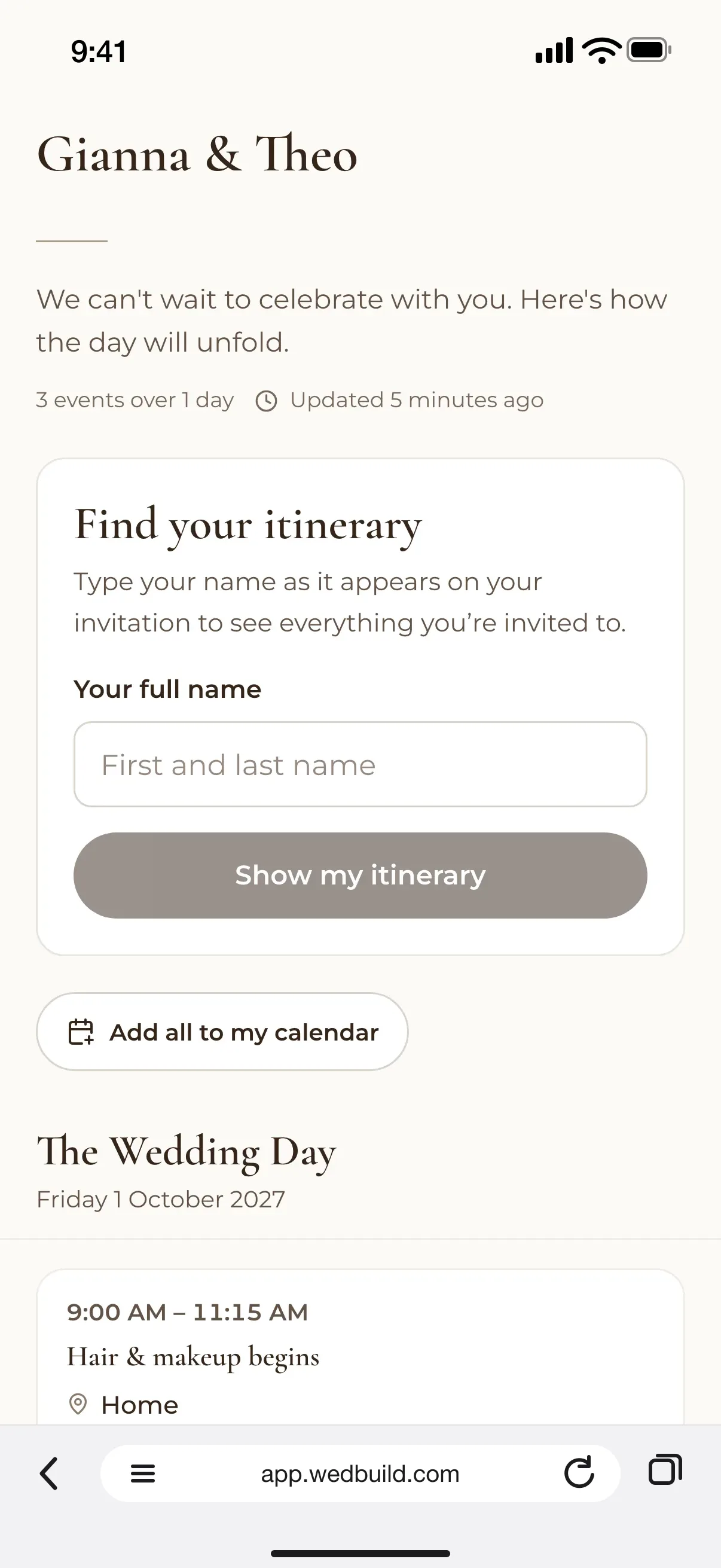
Gianna and Theo's wedding day itinerary on a guest's phone: find your itinerary by name, then The Wedding Day, Friday 1 October 2027, from hair and makeup at 9am
Built from your ceremony time

Enter one time and get the whole day to edit, from hair and makeup to the last song. Then give every guest their own version, and your venue the run sheet.

Every Pro tool and no guest limit, free for your first 7 days. No card needed.

  • FreeThe whole itinerary, guest links and printing
  • ProMoments linked to the vendors you've chosen

Every wedding day runs on a timeline someone wrote down: when the photographer arrives, when the speeches start, when the bus leaves. Usually it lives in a spreadsheet only one person can find. WedBuild's wedding day itinerary starts from your ceremony time and hands you the whole day, ready to edit.

It's also the run sheet you share. Each guest gets their own version with only what they need, your venue gets the timings, and your private notes stay with you.

How it fits together

The day itself, and the weekend around it

Your itinerary is the order of the wedding day. The welcome drinks, rehearsal dinner and recovery brunch, each with their own guests and RSVPs, live in your event schedule and join each guest's itinerary from there. The guests come from your guest list, your wedding website can show their itinerary too, and all the wedding planning tools share the same list.

What you can do

The whole day, minute by minute.

Free on Essentials, with no time limit. Every new account also gets every Pro tool for 7 days.

EssentialsFree
  • Start from your ceremony time: 20 moments, ready to edit
  • Recalculate when the time changes, and keep the moments you added
  • Add more days for the welcome drinks or the brunch
  • Choose who sees each moment, and keep private notes
  • Give each guest their own itinerary, sent on WhatsApp
  • See whose link has been sent, and who has opened it
  • Print it, save it as a PDF or export it to Excel
Pro addsA$199 once
  • Moments linked to the vendors you've chosen

All of it is in your 7-day free Pro trial. No card needed.

Up close

The day, in the right order.

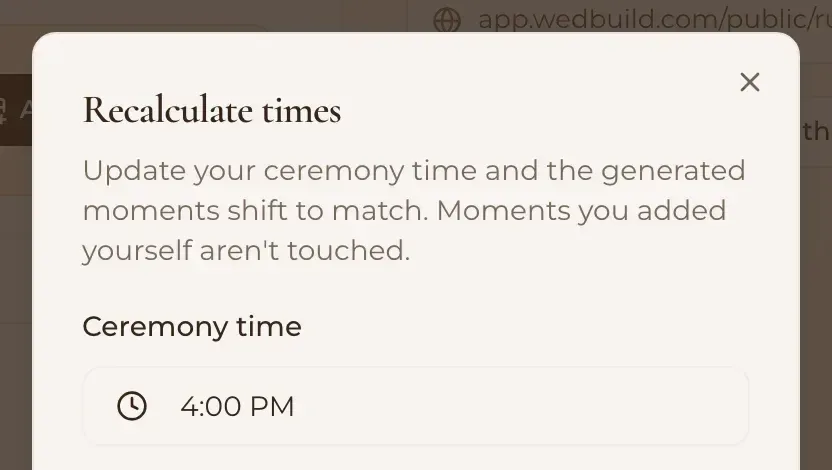
The Recalculate times dialog: update your ceremony time and the generated moments shift to match, moments you added yourself aren't touched, with the ceremony time set to 4:00 PM
Change the ceremony time, and the day follows

Start from your ceremony time

Enter your ceremony time and WedBuild lays out 20 moments around it, from hair and makeup seven hours before to the last song eight hours after. Edit, move or delete any of them, add your own, and add more days if the celebration runs longer. If the time changes, Recalculate moves the moments it made, and the ones you added yourself aren't touched.

  • ProEach moment linked to the vendor you've chosen
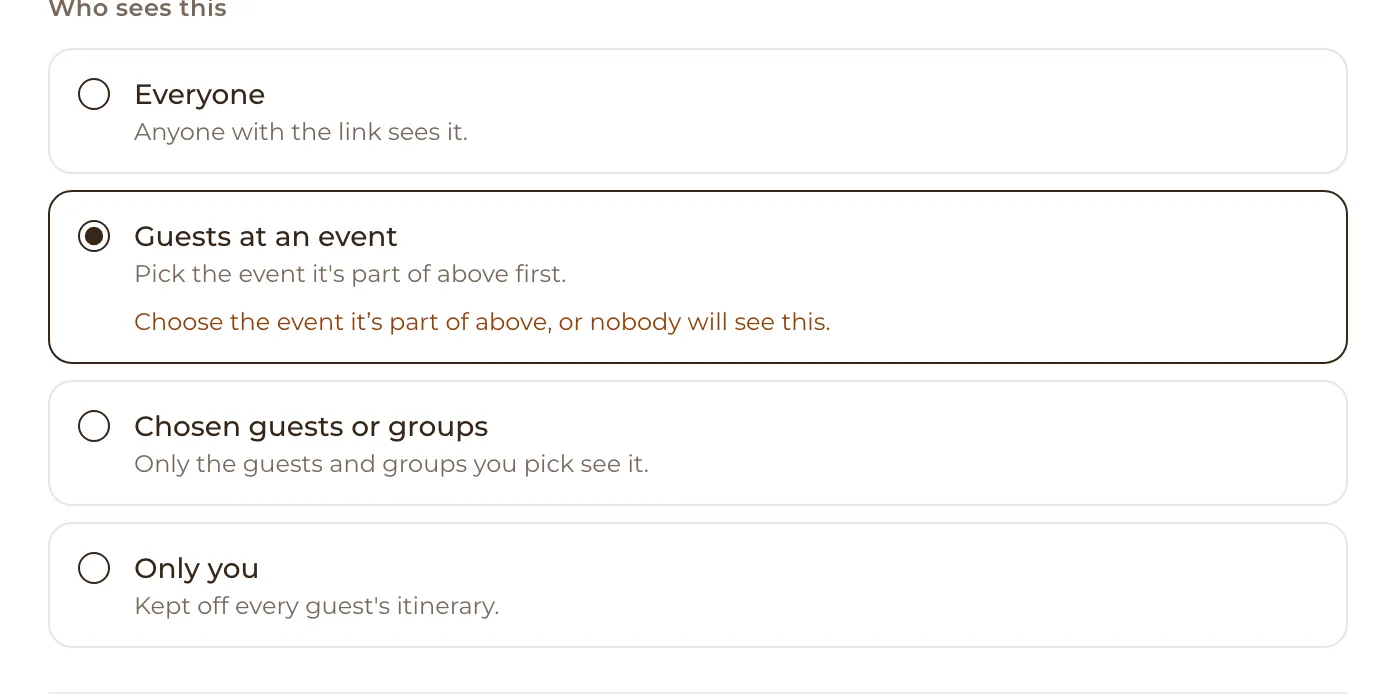
Who sees this: Everyone, anyone with the link sees it; Guests at an event, which is selected; Chosen guests or groups; and Only you, kept off every guest's itinerary
Who sees this, moment by moment

Choose who sees each moment

Show a moment to everyone, to the guests at one event, to the guests or groups you pick, or only to you. The bridal party's hair and makeup times stay with the bridal party. Private notes stay with the two of you, so 'call the florist if it rains' never reaches a guest's phone.

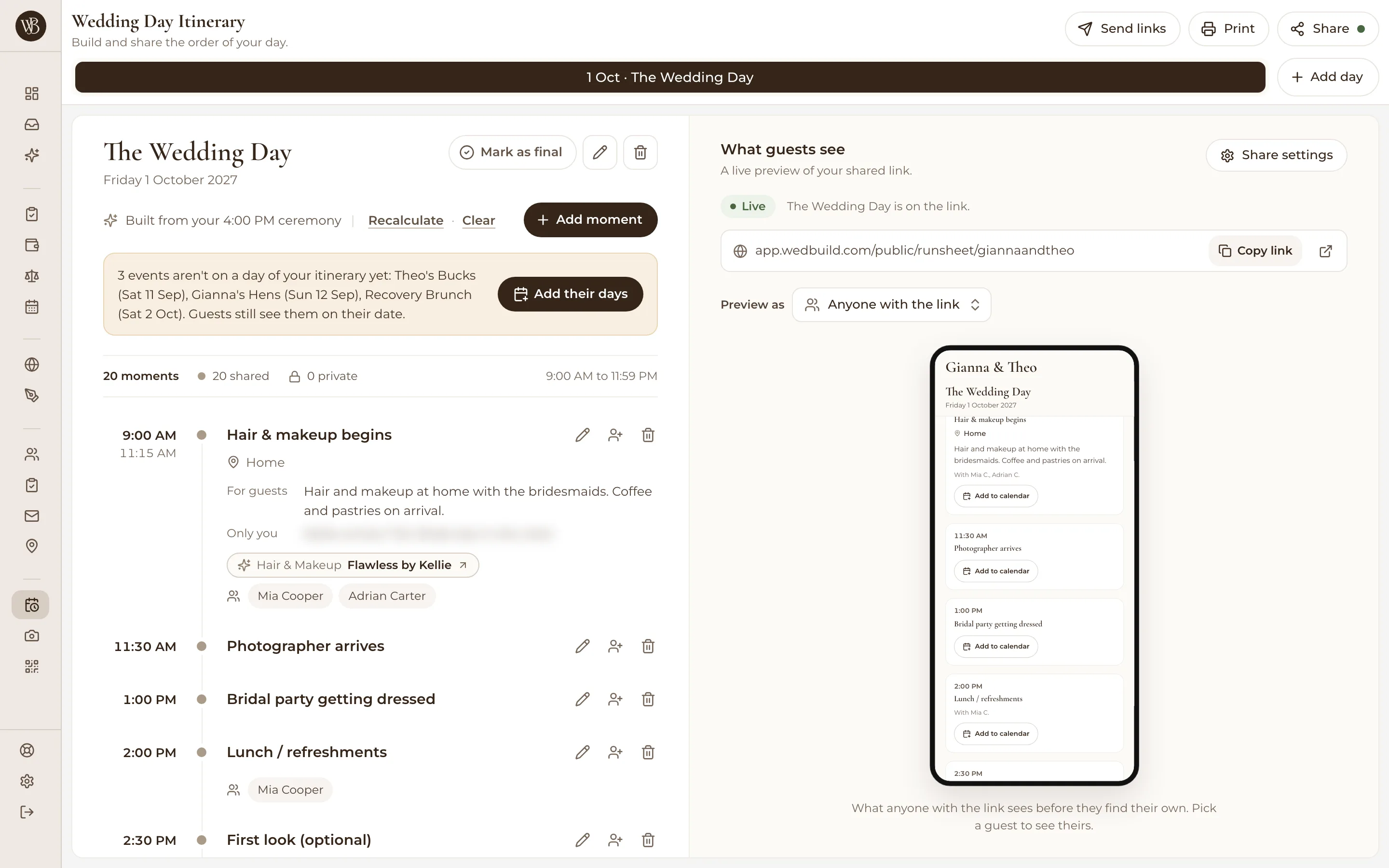
The Wedding Day Itinerary page on a laptop: The Wedding Day built from a 4:00 PM ceremony, 20 moments from hair and makeup at 9:00 AM, and a What guests see preview of the shared link

What a guest sees, and the live preview beside your day.

Give each guest their own itinerary

Turn on personal itineraries and every guest gets a link to their own version, with only what they're invited to. Send it on WhatsApp, and see whose link has been sent and who has opened theirs. Your share link (with a password, if you like) always shows the latest version, and What guests see previews it live as you edit.

Print it, map it, hand it to your venue

Print the itinerary or save it as a PDF, export it to Excel, and mark a day as final once it's settled. Guests open directions in Google or Apple Maps and add any moment to their calendar. Your venue or caterer can have a link of their own with the run sheet on it, and no account to make.

  • “Visual seating chart was a lifesaver. Printed the dietaries straight for the caterer. 10/10.”
    Bill & RachelAdelaide, SA, 122 guests
  • “Vendor comparison made picking our photographer actually easy. Loved it.”
    Karlee & JimAdelaide, SA, 160 guests
  • “Guests scanned a QR code and found their seat. No chaos. Genius.”
    Ellie & AloAdelaide, SA, 63 guests

How it works

Three steps to a day that runs on time.

  1. Enter your ceremony time

    WedBuild lays out 20 moments around it. Edit any of them, add your own, and add more days if you need them.

  2. Choose who sees what

    Show each moment to everyone, to the guests at an event, to chosen guests, or only to you.

  3. Share it

    Send every guest their own link on WhatsApp, print copies for the wedding party, and give your venue the run sheet.

Which plan has it

Free to start, and free to keep.

  • Essentials

    Freeno time limit, no card

    The whole itinerary, guest links and printing

  • Pro

    A$199once, for 2 years

    Moments linked to the vendors you've chosen

Every new account gets every Pro tool for 7 days. No card needed. 14-day money-back guarantee on paid plans.

Compare every plan

Questions

Before you plan the day.

What time should everything happen with a 4pm ceremony?

WedBuild's starting itinerary works out from the ceremony. With a 4pm ceremony, hair and makeup begins at 9am, the photographer arrives at 11:30am, wedding party photos are at 3pm and guests arrive at 3:30pm. After the ceremony come canapés and cocktails at 4:45pm, guests seated for the reception at 6pm, dinner at 7pm, speeches at 8pm, the cake cutting and first dance at 9pm, and the last song and send-off just before midnight. Every time is yours to change.

What's the difference between a wedding itinerary and a run sheet?

They're the same timeline for different readers. The run sheet is the full version for you, your wedding party and your vendors, with every call time and private note, while the itinerary is what your guests need. In WedBuild it's one timeline, and you choose who sees each moment.

Can each guest get their own itinerary?

Yes. Turn on personal itineraries and every guest gets a link to a version with only the moments and events they're invited to. Send it on WhatsApp or with a button in any email, and see who has opened theirs.

What if our ceremony time changes?

Press Recalculate and enter the new time. Every moment WedBuild generated moves to match, and the moments you added yourself stay exactly where you put them.

Can I print the run sheet for our vendors?

Yes. Print it or save it as a PDF, or export it to Excel, choosing what to include. Your venue or caterer can also have their own link with the run sheet on it, with no account needed.

Is the wedding day itinerary free?

Yes. The itinerary, a personal link for each guest and printing are all on WedBuild's free Essentials plan, for up to 50 guests. Linking moments to the vendors you've chosen comes with Pro, which every new account gets free for its first 7 days.

Guides to go deeper

Read up, then plan.

Still deciding? Compare wedding planning apps in our guide to the best ones in Australia, WedBuild included.

Planning the whole weekend? See the event schedule.

A bride and groom kiss in the aisle as their guests throw confetti

Ready when you are

One timeline, for everyone in it.

The wedding day itinerary is free on Essentials. Enter your ceremony time tonight and start with the whole day, ready to edit.

Every Pro tool and no guest limit, free for your first 7 days. No card needed.
Pay once if you upgrade, never a subscription.