A wedding photo sharing app your guests never have to download
No app, no account
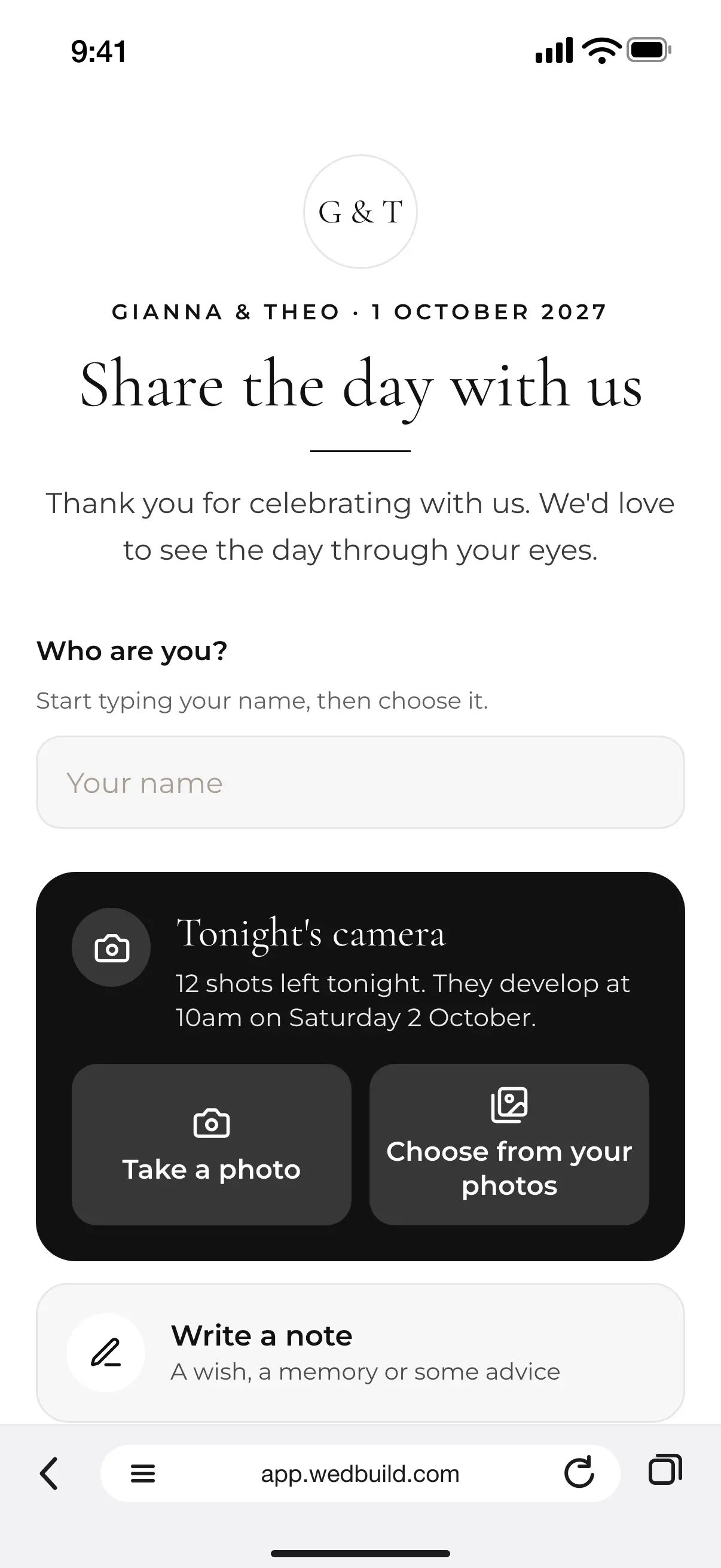
Guests scan the QR code on their table, type their name and share. Photos, short videos, notes and voice messages all land with you, in one place by the morning after.
Every Pro tool and no guest limit, free for your first 7 days. No card needed.
StandardGuests' written notes, in your website guestbook
ProAll of Guest Memories. Or add it once to Essentials or Standard
Your guests take more photos of your wedding than anyone, and most of them never leave their phones. A shared album asks everyone to sign in before they can add a thing, a group chat buries them, and the candid ones you'd love most never arrive.
Guest Memories brings them home. Guests scan a QR code, type their name and share straight from the browser, with nothing to download, and everything they send lands with you.
How it fits together
The same codes, the same night
Guest Memories runs on what you already have. Guests who scan the table code to find their seat can share their photos from that same page, your wedding website gets a photo page, and guests who can't come can leave a message from the RSVP form. The table cards print from the same designer as your invitations. See all the wedding planning tools to follow the whole night.
What you can do
Everything they saw, and everything they said.
Every part of it is in your 7-day free trial. After that it comes with Pro, or you can add it to an Essentials or Standard wedding once, as a one-off add-on.
StandardA$99 once
A written guestbook: guests' notes on your website
In your 7-day free Pro trial too. No card needed.
Pro addsA$199 once
Photos, and videos up to 30 seconds, from a QR code
No app and no account: guests just type their name
Tonight's camera: a disposable camera on every phone
Voice and video messages, after your own greeting
A live slideshow and up to 5 photo challenges
One album the morning after, with Download all
All of it is in your 7-day free Pro trial. No card needed.
Up close
Every photo, every voice, one album.
01
Every guest's photos, with nothing to download
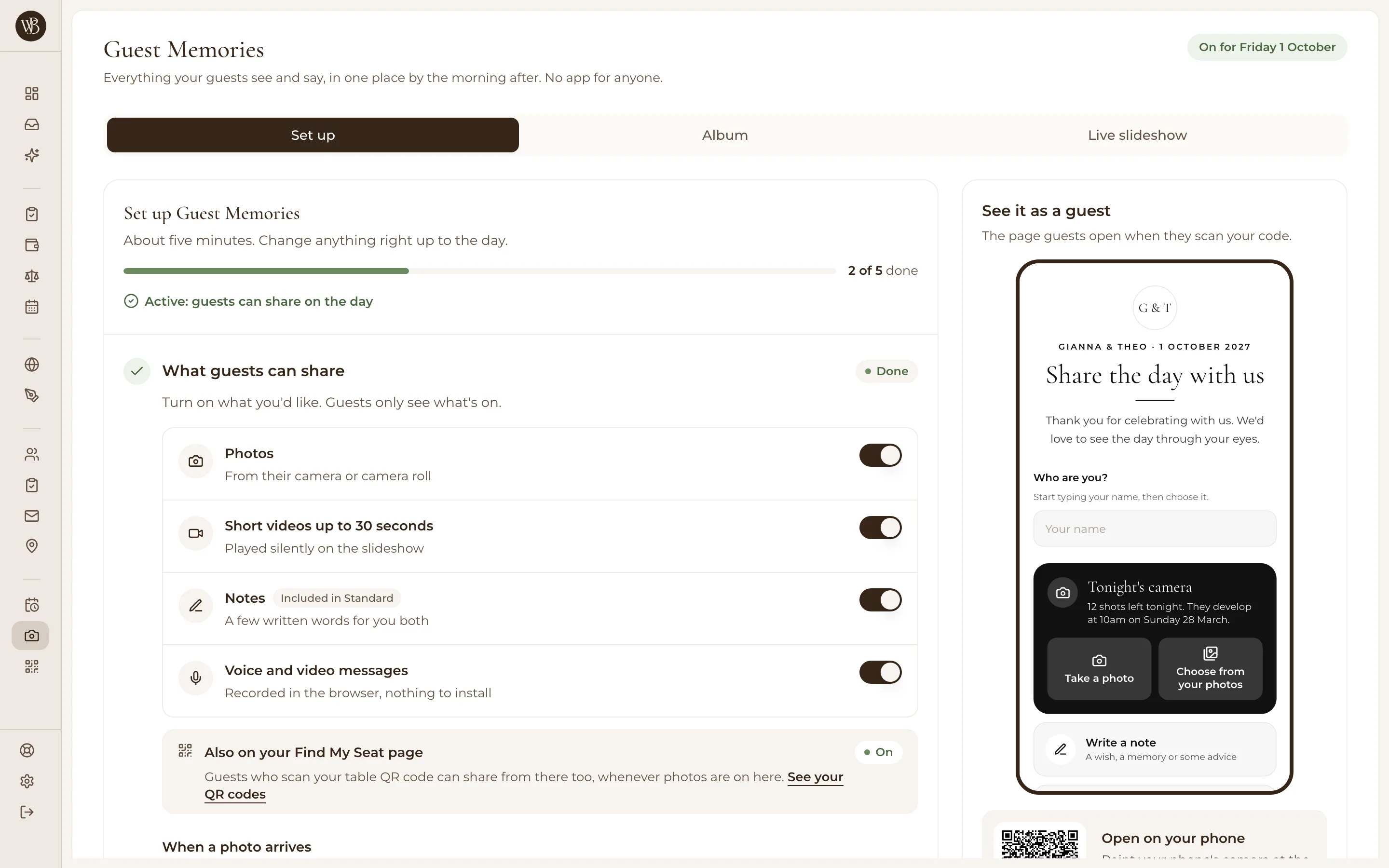
Guests share photos, and videos up to 30 seconds, from the QR code on their table, your wedding website's photo page or the Find My Seat page at the venue. They type their name so you know who sent what, and that's all. Choose 'Check each one first' to approve every photo in your Inbox before anyone sees it, or 'Show photos straight away'.
02
A disposable camera on every phone
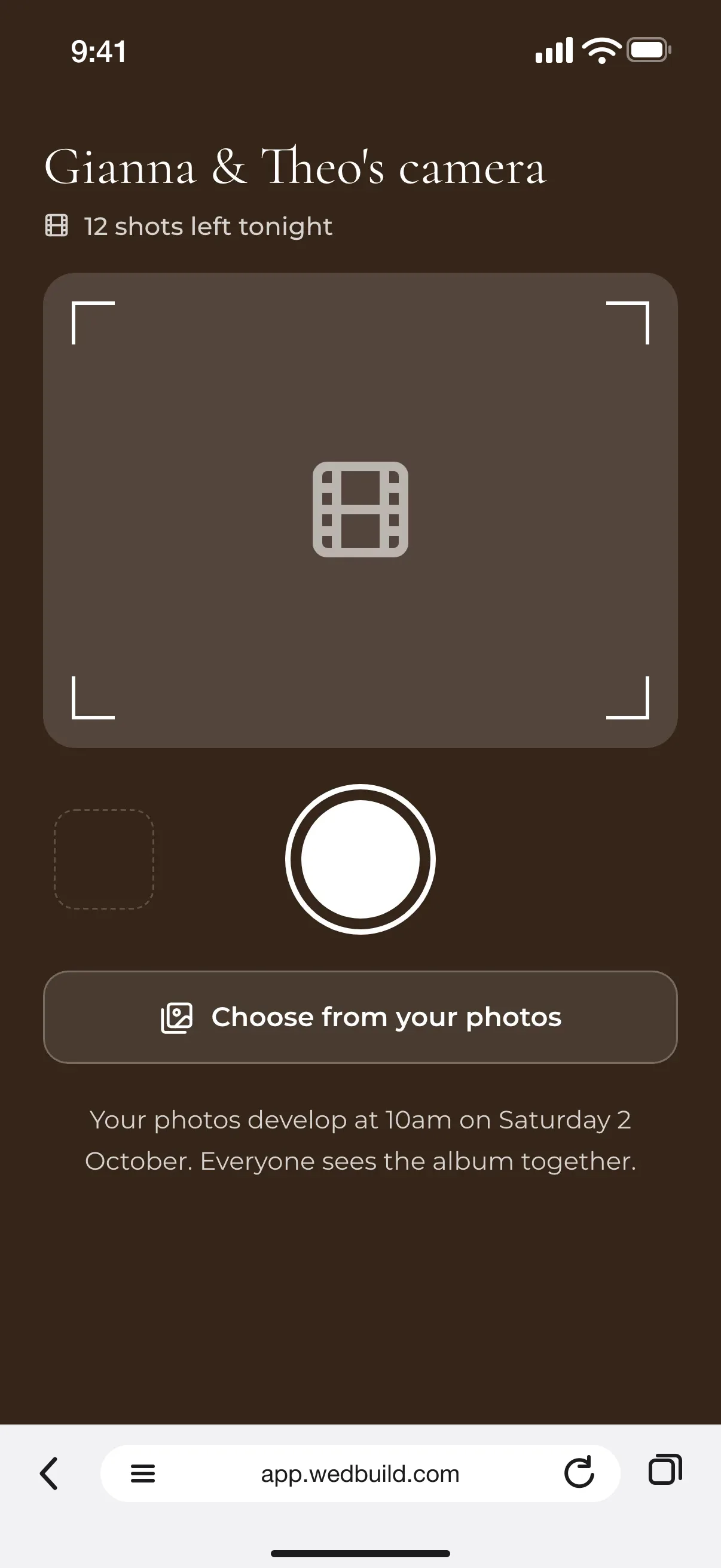
Tonight's camera gives each guest 10, 12 or 24 shots, or as many as they like. Nobody sees a thing until the photos develop: at the end of the night, the next morning, at a time you choose, or when you press Reveal. Then everyone sees the album together, like picking up the prints.
03
An audio guestbook, with nothing to hire
Record a greeting of up to a minute and guests hear it first, then leave you up to 2 minutes of voice or a minute of video, right in the browser. Only the two of you will hear them. Guests who can't come can leave one from the RSVP form, and anyone who'd rather write can leave a note, with a photo if they like.
04
Live on the big screen, all night
Put the live slideshow on the venue's screen and guests' photos play as they arrive, newest first, shuffled or oldest first, for 4 to 15 seconds each with a fade, slide or zoom. A small QR code in the corner invites everyone else to add theirs. Set up to 5 of Tonight's challenges ('the best dance move of the night') and watch the room go looking.
05
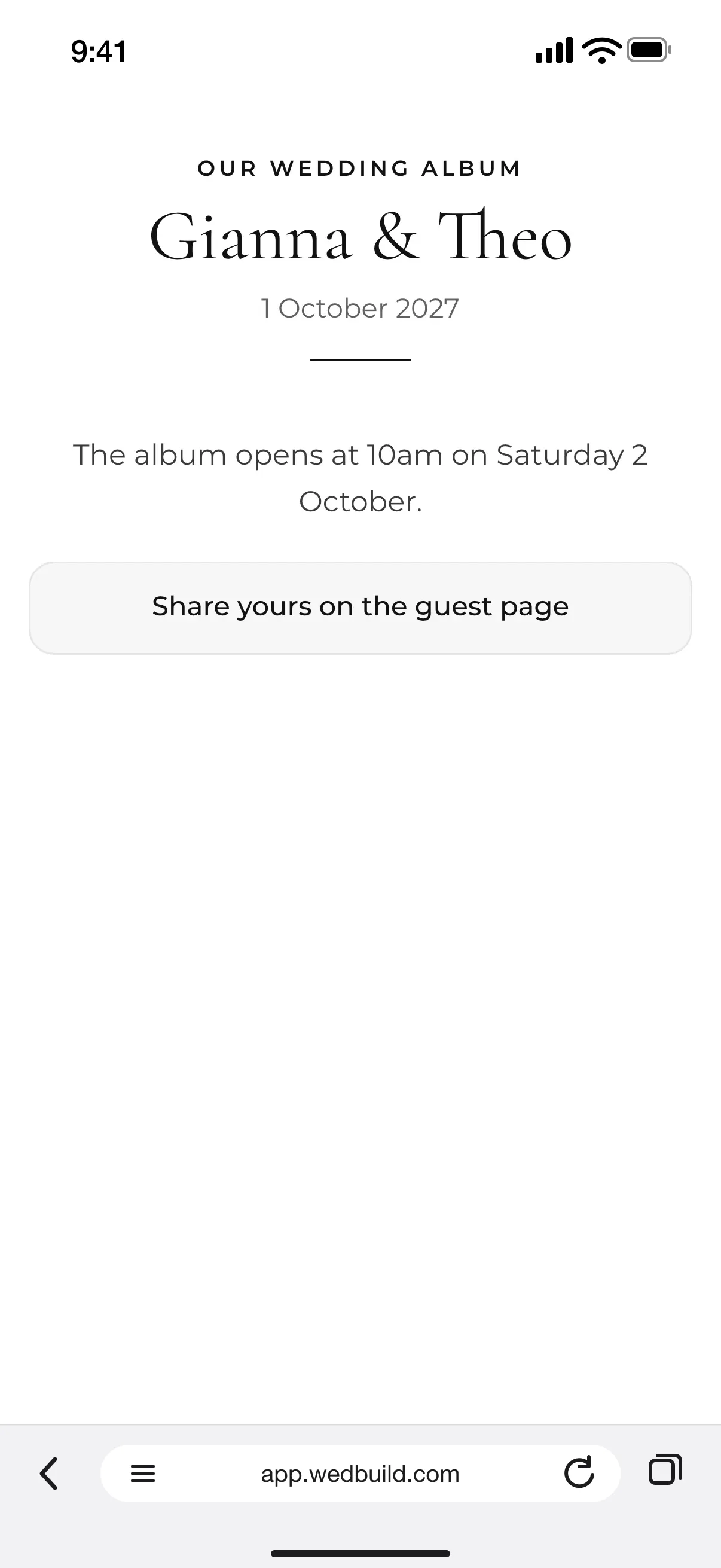
The morning after, it's all in one album
Most photos arrive the next day, once guests are home, so every household that said yes gets an email with its own link, a second note a week later if they haven't shared, and word when the album is ready. The album comes in 5 layouts, from Mosaic to Prints. You can download it all, each guest can download their own, and everything is kept for at least 2 years.
“Visual seating chart was a lifesaver. Printed the dietaries straight for the caterer. 10/10.”
Bill & RachelAdelaide, SA, 122 guests
“Vendor comparison made picking our photographer actually easy. Loved it.”
Karlee & JimAdelaide, SA, 160 guests
“Guests scanned a QR code and found their seat. No chaos. Genius.”
Photos, short videos, notes, voice and video messages: turn on what you'd like, record your greeting and decide how the night runs. It takes about five minutes.
2
Print your table cards
Pick one of 3 ready-made Guest Memories cards in Studio, or download the QR code for your own sign. Every code opens the same page.
3
Open the album
Everything guests share waits in your Inbox and fills the album. Download the lot whenever you like, and it's kept for at least 2 years.
Which plan has it
Pay once, never a subscription.
Standard
A$99once, for 2 years
Guests' written notes, in your website guestbook
Pro
A$199once, for 2 years
All of Guest Memories. Or add it once to Essentials or Standard
All of it is in your 7-day free Pro trial. No card needed. 14-day money-back guarantee on paid plans.
No. Guests scan the QR code with their phone's camera, type their name and share straight from the browser. There's no app to install and no account to make, and their phone remembers their name for next time.
How is this different from a shared Google Photos album?
To add photos to a Google Photos shared album, guests need a Google account, and many never get around to it. Guest Memories only asks for a name. It also does what an album can't: a disposable camera, voice and video messages, notes, and a live slideshow at the venue.
Is there a disposable camera app for weddings?
Yes: Tonight's camera turns every guest's phone into one. You choose 10, 12 or 24 shots each, or unlimited, and the photos develop at the end of the night, the next morning, at a time you set, or when you press Reveal. It's part of Guest Memories, so there's no price per guest.
Can guests leave voice messages, like an audio guestbook?
Yes. Guests first hear a greeting you recorded, then leave up to 2 minutes of voice or 1 minute of video, recorded in the browser with nothing to install. Only the two of you hear them, and guests who can't come can leave one from the RSVP form.
Can we check photos before anyone sees them?
Yes. Choose 'Check each one first' and every photo waits in your Inbox until you approve it, or 'Show photos straight away' to let them go up as they arrive. If a guest reports something, it comes down until you choose Keep or Remove.
Which plan includes Guest Memories?
Pro includes Guest Memories, and every part of it is in your 7-day free trial. On Essentials or Standard you can add it to your wedding once, as a one-off add-on with no subscription and a 14-day money-back guarantee; our pricing page shows the price in your currency. Once added, it stays on even after a trial or plan ends.