QR code seating chart

A QR code seating chart that shows guests to their seat

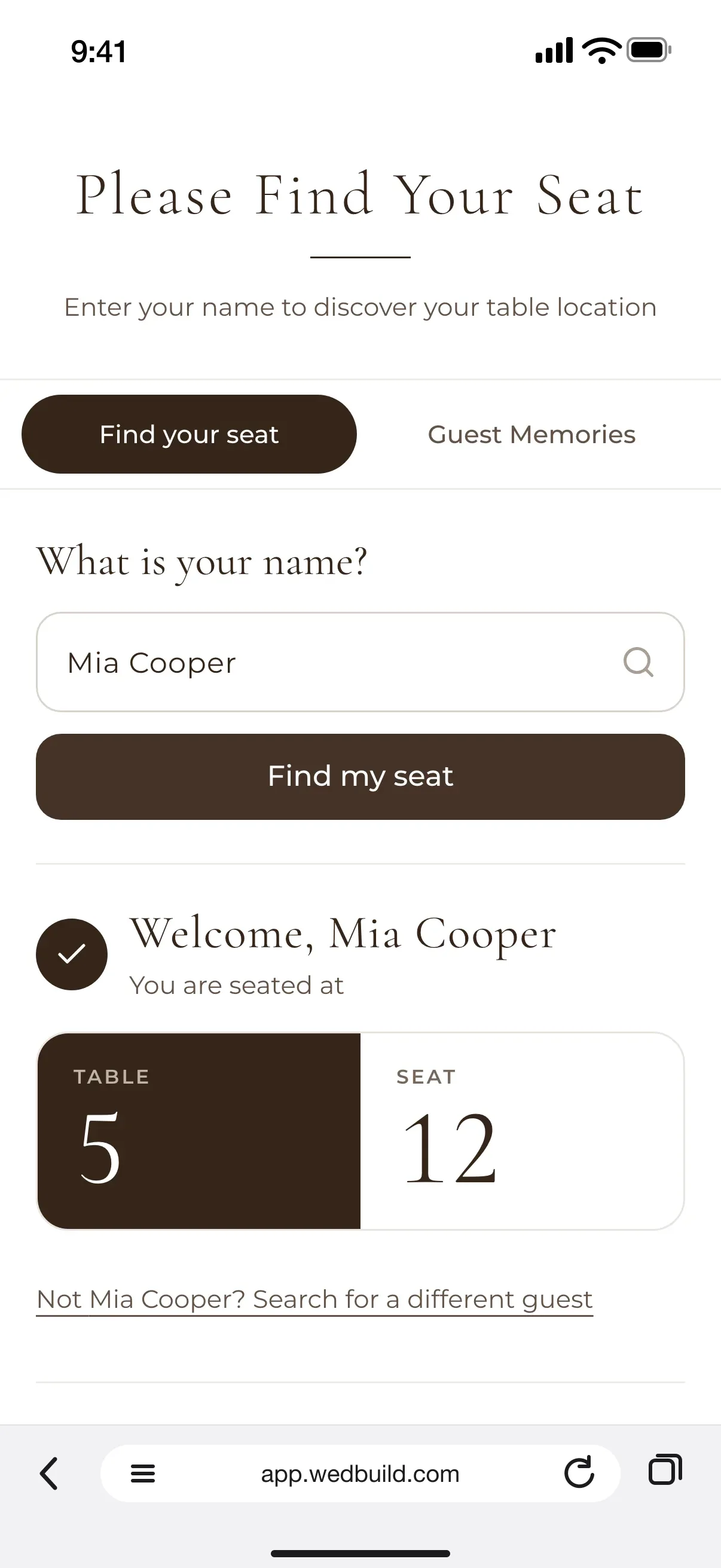
Find My Seat on a guest's phone: Welcome, Mia Cooper, you are seated at table 5, seat 12, with the reception layout below
No app to download

Guests scan a code at the door, type their name and see their table and seat on a map of the room. No app, no crowd around the board, and a kind backup for anyone who'd rather not scan.

Every Pro tool and no guest limit, free for your first 7 days. No card needed.

  • ProQR Find My Seat for guests, with the room chart

On the night, your guests just want to find their seat and get a drink. With a QR code seating chart, they scan at the door, type their name, and their own phone shows them the table, the seat and where it is in the room.

One couple who shared their QR seat finder online summed it up: it was a hit. The worry other couples raised was older guests, so this page covers that too, with a printed backup at the door, the web address under the code and a search that forgives a typo.

One chart, two screens

From your plan to their phone.

Find My Seat shows the seats from your wedding seating chart, which seats the guests your online RSVPs confirmed. The same guest page can hold Guest Memories, and a QR code for wedding photos lets guests share theirs. Still making the plan? Start with the wedding table plan.

What you can do

A seat finder, and a kind backup.

Every Pro tool is free for your first 7 days, so you can try all of it before you choose.

ProA$199 once
  • Guests scan, type their name and see their table and seat
  • A map of the room with their table highlighted
  • Tap a table to see who's there, with a line you write about each guest
  • A forgiving name search, for up to 2,000 guests
  • Set up from your room chart, or a picture of the venue's floor plan
  • Download the QR code as a PNG, ready to print
  • A printed A to Z list for the door, from your room chart
  • Menus, photos and Guest Memories on the same page

All of it is in your 7-day free Pro trial. No card needed.

Up close

Simple at the door, easy to set up.

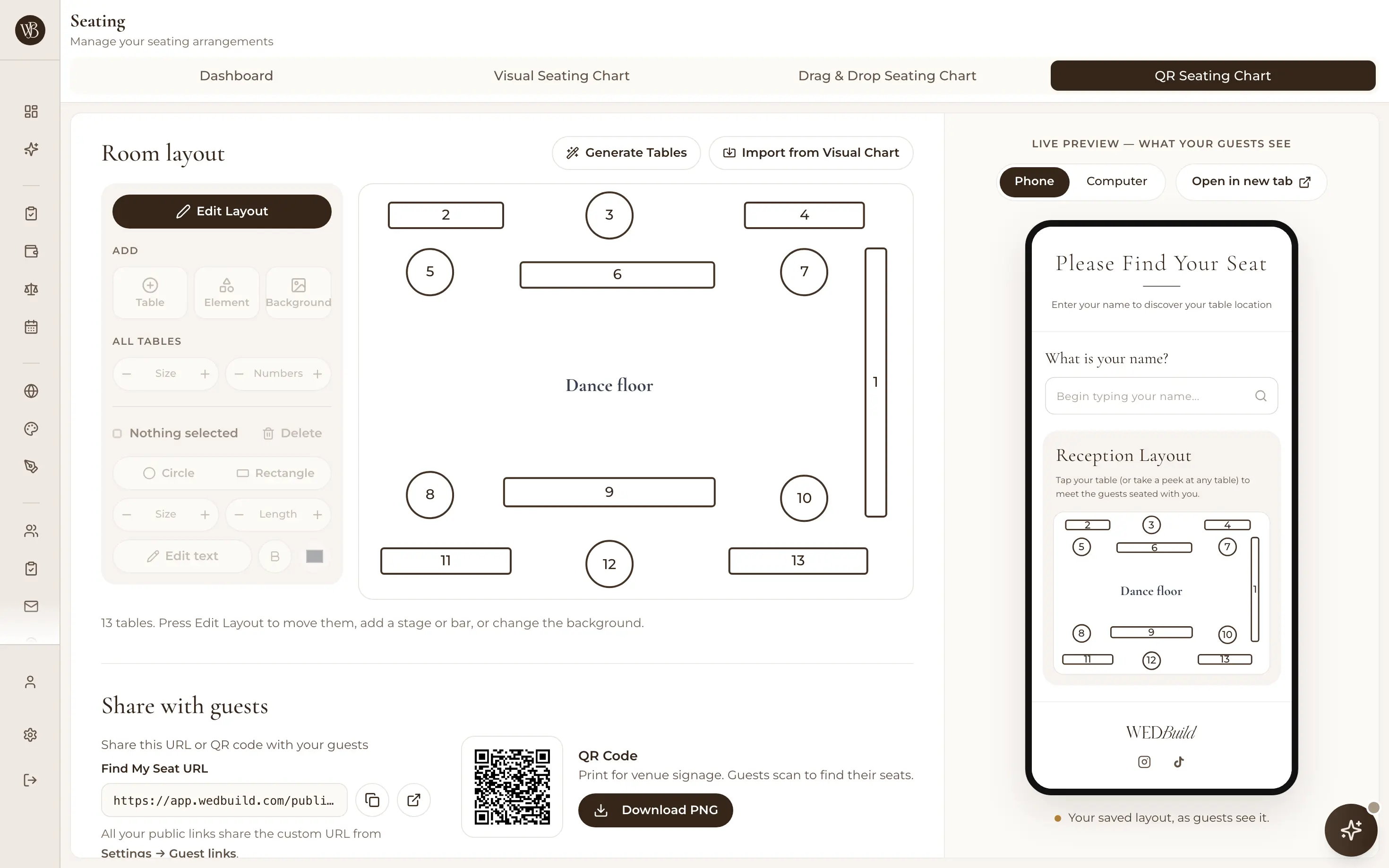
The QR seating chart on a laptop: the room layout with 13 tables around the dance floor, a live preview of what guests see on a phone, and the QR code with a Download PNG button

Set up from your room chart

Import the room straight from your seating chart, or upload a picture of the venue's floor plan instead. Download the QR code as a PNG at 300, 600 or 1000 pixels, ready for a sign at the door or a card on each table. The code never changes, so a late seat swap means nothing to reprint.

  • ProQR Find My Seat for guests
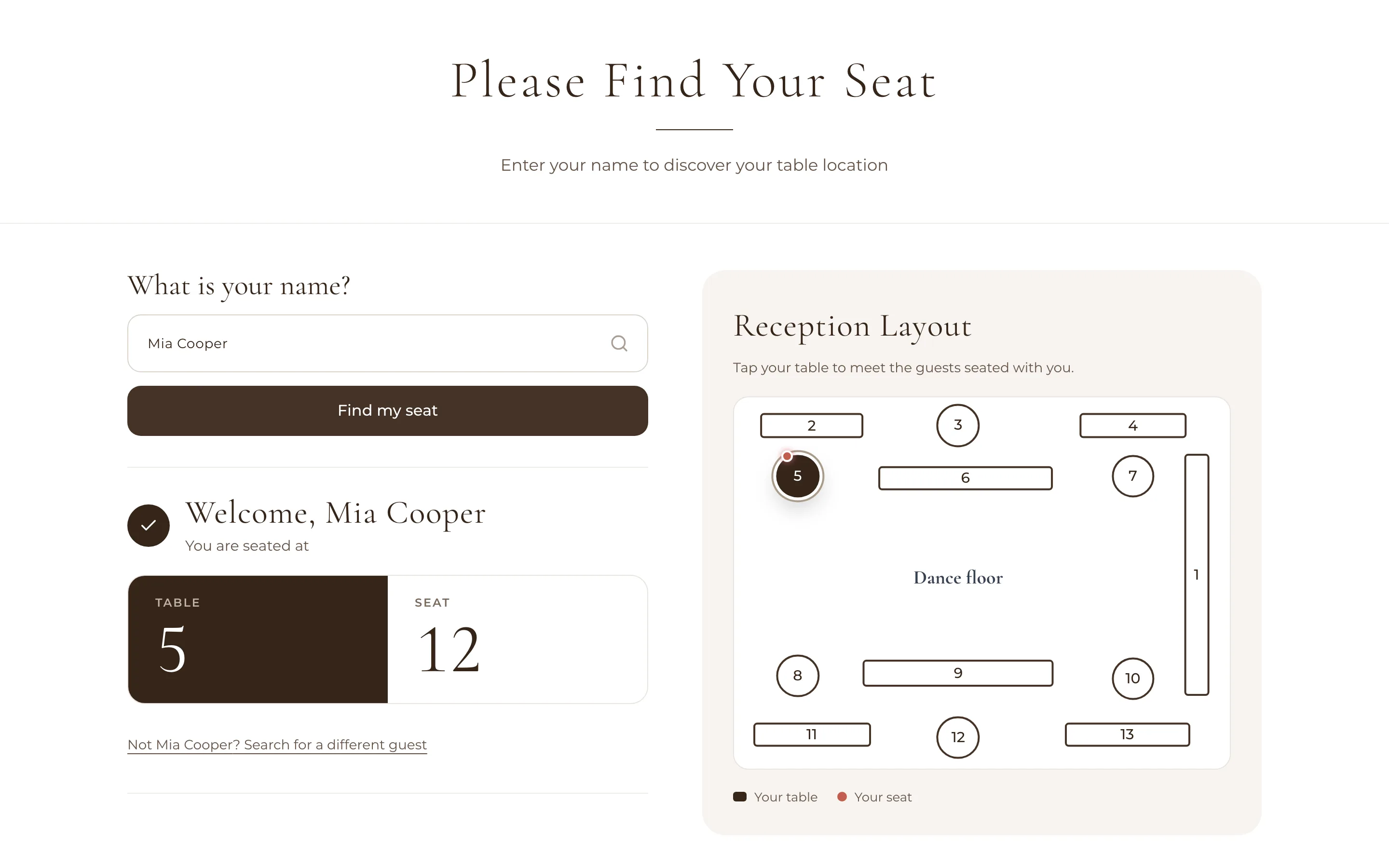
Find My Seat on a computer: Welcome, Mia Cooper, seated at table 5, seat 12, beside the reception layout with table 5 and her seat marked

The same page on a laptop or tablet: handy on a table by the door.

Kind to older guests

Print the page's web address under the QR code, and keep the printed A to Z list at the door for anyone who'd rather not scan. The name search forgives a typo, so nobody has to spell their name perfectly. And the page tells every guest their name is only used to find their seat, and isn't stored.

  • ProThe A to Z list prints with the room chart
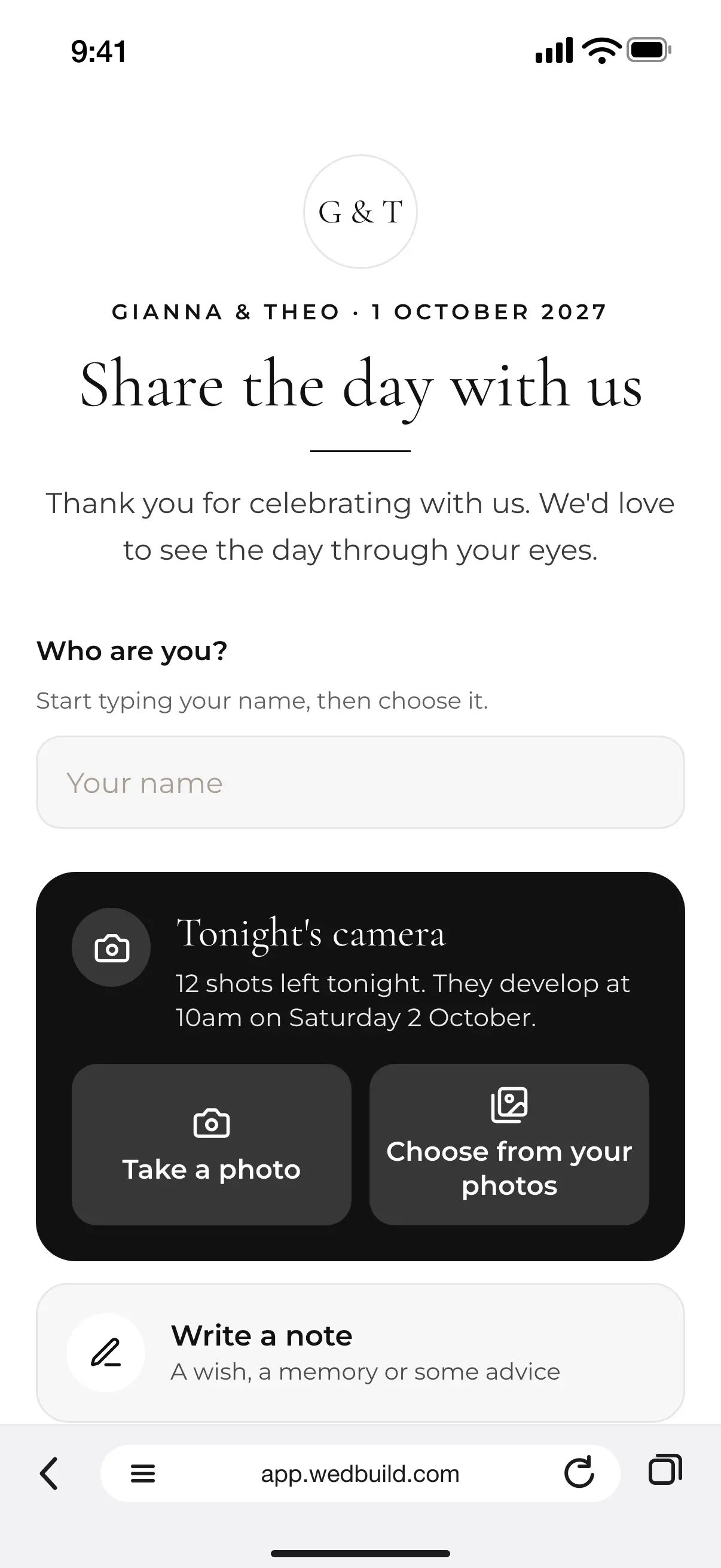
Guest Memories on a guest's phone: Gianna & Theo, Share the day with us, Tonight's camera with 12 shots left, Write a note and Leave a voice or video message

Menus and memories, on the same page

The same QR code can open your menu and anything else guests need on the day: up to 12 PDFs, pictures or links. Turn on Guest Memories and guests can share their photos, notes and messages from the same page, with no app and no sign-up.

See how Guest Memories works
  • ProGuest Memories: photos, videos and messages

Find My Seat

From the door to their chair, on their phone.

No app to download, and nothing for guests to sign up to.

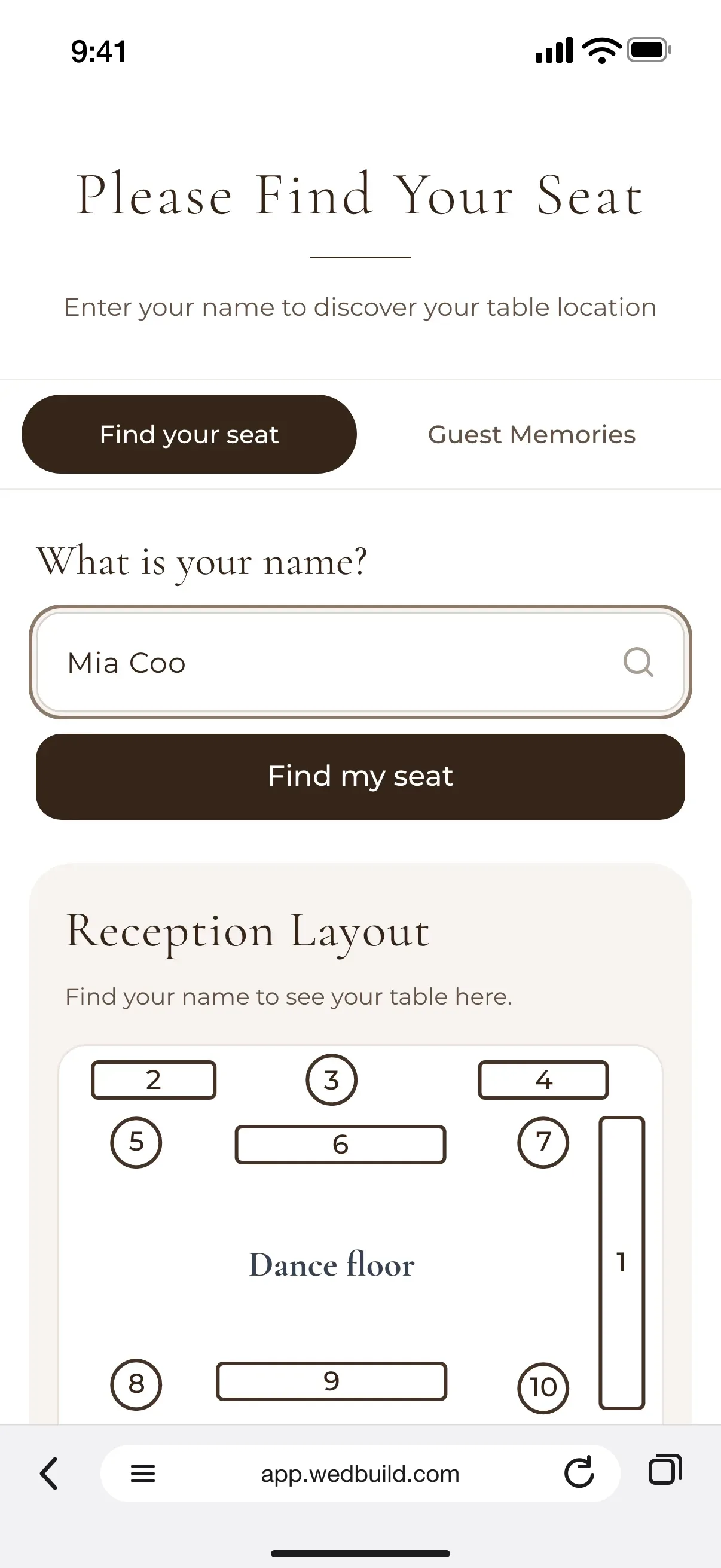
  1. Find My Seat on a guest's phone: Please find your seat, a name being typed, and the reception layout of tables around the dance floor

    They scan and type

    The search forgives a typo, and their name isn't stored.

  2. Find My Seat on a guest's phone: Welcome, Mia Cooper, you are seated at table 5, seat 12, with the reception layout below

    They see their seat

    Table and seat in big, clear numbers.

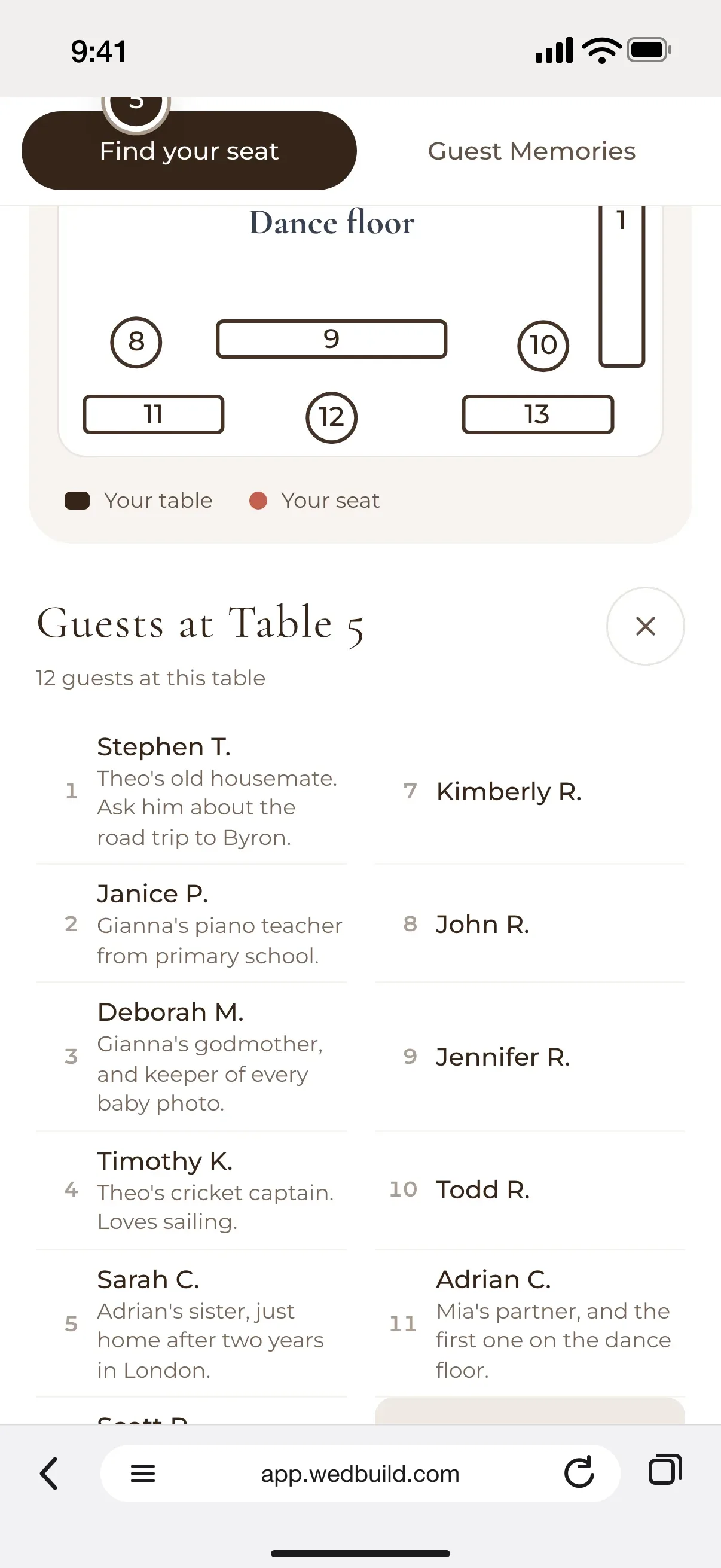
  3. Find My Seat on a guest's phone: the guests at table 5, each with a line from the couple, like Theo's old housemate and Gianna's piano teacher, with Mia Cooper marked You

    They meet their table

    Tap any table to see who's there, with a line you can write about each one.

“Guests scanned a QR code and found their seat. No chaos. Genius.”
Ellie & AloAdelaide, SA, 63 guests
“Visual seating chart was a lifesaver. Printed the dietaries straight for the caterer. 10/10.”
Bill & RachelAdelaide, SA, 122 guests

How it works

Ready for the door in three steps.

  1. Seat your guests

    Make your seating chart in WedBuild and import the room, or upload a picture of the venue's floor plan.

  2. Download the QR code

    Print it on a sign by the door, with the page's web address underneath for anyone who'd rather type.

  3. Keep a printed list too

    The A to Z list prints from your room chart. Put it beside the sign, so every guest has a way in.

Which plan has it

Pay once, never a subscription.

  • Pro

    A$199once, for 2 years

    QR Find My Seat for guests, with the room chart

All of it is in your 7-day free Pro trial. No card needed. 14-day money-back guarantee on paid plans.

Compare every plan

Questions

Before you print the code.

How does a QR code seating chart work?

You print a QR code on a sign at the entrance. Guests scan it with their phone camera, type their name, and see their table and seat, with a map of the room that highlights their table. Tapping any table shows who's sitting there.

What about older guests who don't use QR codes?

Give them more than one way in. Print the page's web address under the QR code, keep a printed A to Z list of names at the door, and ask an usher or a younger relative to help anyone who'd like it. The name search forgives typos, so nobody has to spell their name perfectly.

Do guests need an app or an account?

No. Find My Seat opens in the phone's web browser, and guests only type their name. The page tells them their name is only used to find their seat, and isn't stored.

Can I still have a printed seating chart?

Yes, and it's a good idea. With Pro, the room chart prints as a room plan, a page for each table, an A to Z list of names and fold-over place cards, on A4 or US Letter. Put the printed list beside the QR code sign at the door.

What if I change the seating after printing the QR code?

There's nothing to reprint. The QR code always opens the same page, and each guest's seat is looked up when they search, so the code you printed keeps working after a change.

Which plan includes Find My Seat?

Find My Seat is part of WedBuild Pro, a one-time payment, along with the room designer, Smart Seating and printable table cards. Every new account gets every Pro tool free for 7 days with no card needed, so you can set it up and scan it yourself before you decide. The price page compares every plan.

Guides to go deeper

Read up, then plan.

Still deciding? Compare wedding planning apps in our guide to the best ones in Australia, WedBuild included.

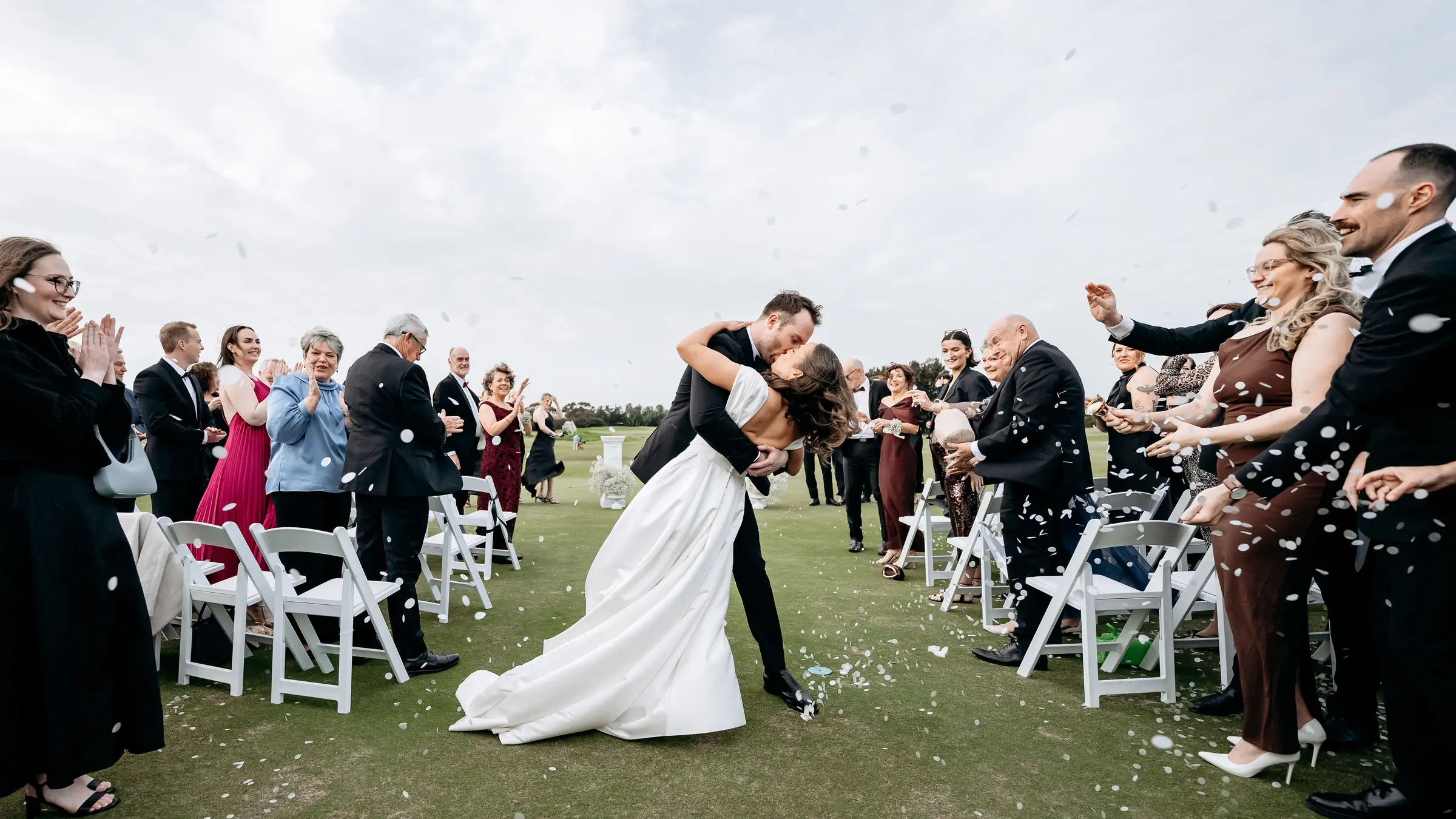
A bride and groom kiss in the aisle as their guests throw confetti

Ready when you are

Every guest, in their seat.

Start with your guest list today, and your QR code is ready when the seating is.

Every Pro tool and no guest limit, free for your first 7 days. No card needed.
Pay once if you upgrade, never a subscription.