Wedding table plan

Make your wedding table plan in minutes, not evenings

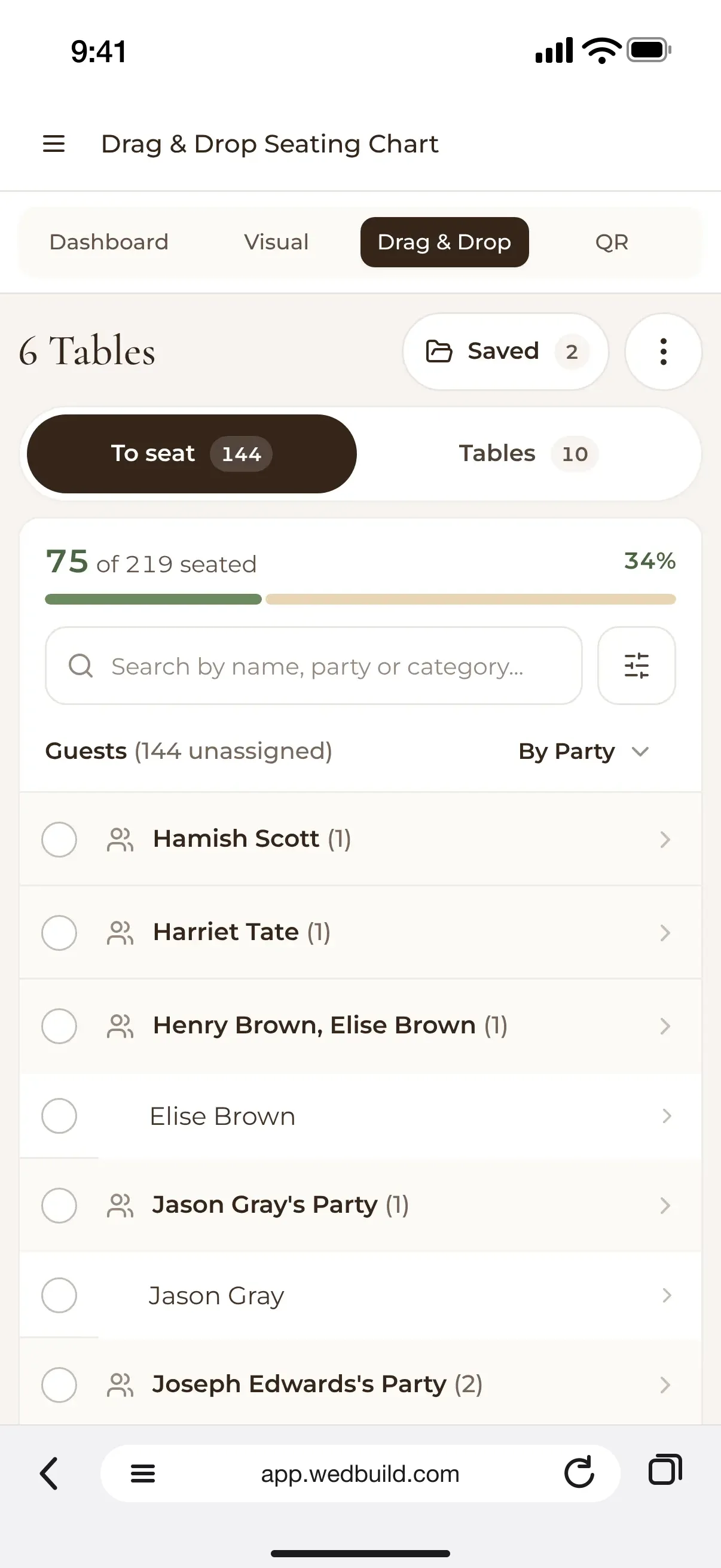
A table plan on a phone: 6 Tables, 75 of 219 guests seated, and the 144 still to seat listed by party
Free to try, no account

Paste your guests, pick a room and seat everyone in one press. Try it free with no account, then keep your plan when the yeses are in.

Every Pro tool and no guest limit, free for your first 7 days. No card needed.

  • StandardDrag and drop table plan, with saved versions
  • ProRoom designer, Smart Seating, table cards and Find My Seat

A table plan is a lovely puzzle, right up until the night before the venue needs it. WedBuild keeps the puzzle and takes the stress out: your plan reads from the guest list your RSVPs fill, so you're always seating the people who said yes.

Start with a simple list of tables, or lay out the whole room. Either way, Smart Seating can seat everyone around your rules in one press, and you check its work before anything changes.

One guest list, start to finish

Your guest list, seated.

Your table plan reads from your wedding guest list, and online RSVPs keep that list current, so you seat the people who are coming. See everything the wedding seating chart does, how guests find their seat on the night with a QR code seating chart, and how to plan wedding seating for divorced parents with kindness.

What you can do

Everything a table plan needs, nothing it doesn't.

Every Pro tool is free for your first 7 days, so you can try all of it before you choose.

Try the table plan maker, no signup
StandardA$99 once
  • Tables of any size, with the seat count you choose
  • Drag one guest, or a whole party, onto a table
  • Save versions and keep the one you like
  • Rules for who sits together and who stays apart

In your 7-day free Pro trial too. No card needed.

Pro addsA$199 once
  • Lay out the room: dance floor, bar, band and your own table
  • Seat everyone in one press, with three plans to choose from
  • Print the plan, a page per table, an A to Z list and place cards
  • Let guests find their seat with a QR code

All of it is in your 7-day free Pro trial. No card needed.

No account needed

Make your table plan here, no account needed

This is the real WedBuild seating plan, running in your browser. Paste up to 500 names (put '&' or '+' on a line to make a couple), pick one of five starter rooms, and press Seat everyone for me.

Nothing here is saved, so try as many versions as you like. When you're ready to keep a plan and seat the guests who've actually replied, the seating tools are in the Pro trial: 7 days of every Pro tool with no guest limit, free, and no card needed.

The planner opens full screen on your phone, with tables and guests laid out for touch. No account, and nothing is saved.

Open the free planner →

Up close

From a list of names to a finished plan.

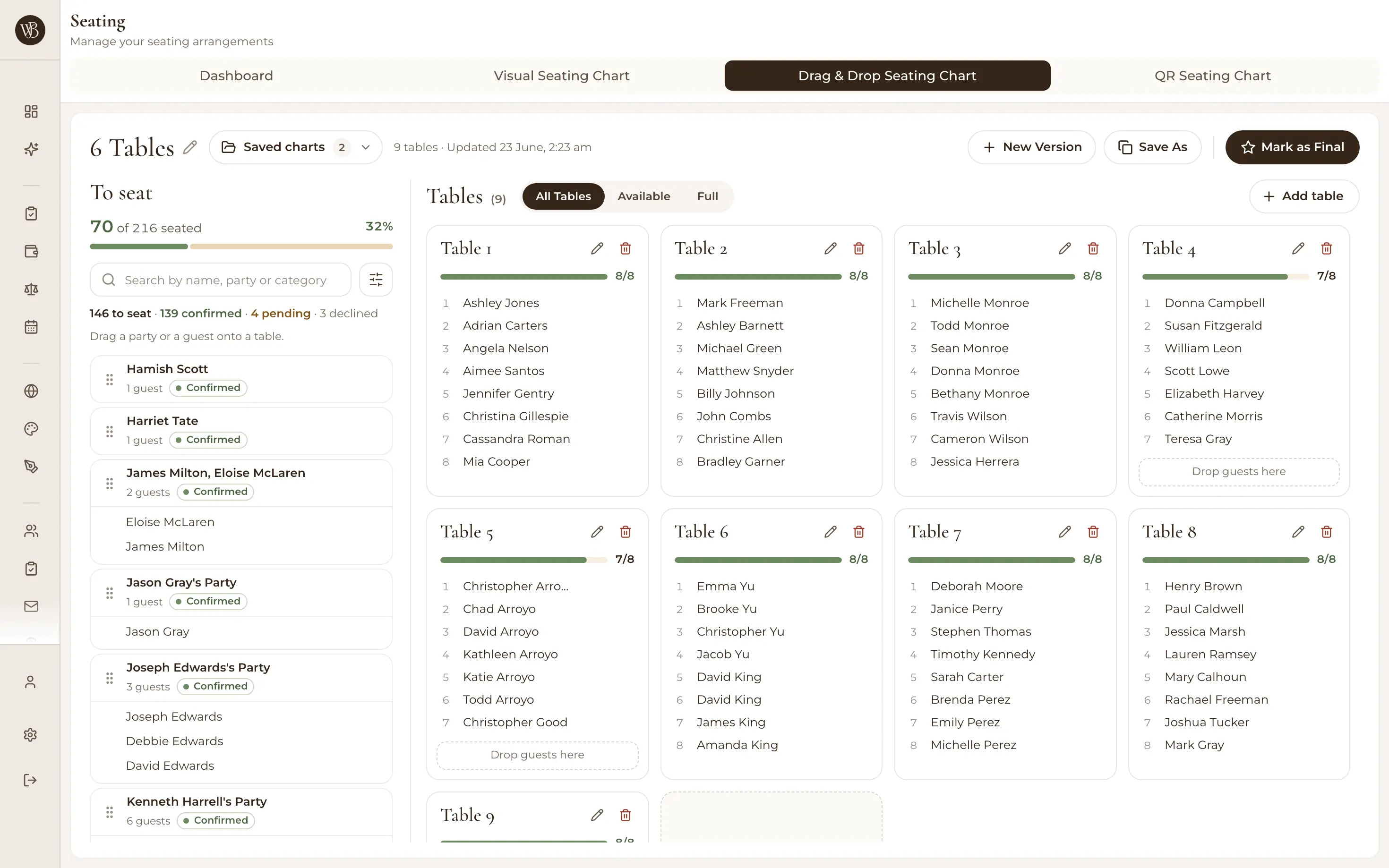
The drag and drop table plan on a laptop: 70 of 216 seated, parties still to seat on the left, and Tables 1 to 8 with each guest's name and how full each table is

A simple table plan, if that's all you need

Drag guests, or a whole party at once, onto tables and watch each one fill. Save as many versions as you like, and add rules for who sits together and who stays apart. The plan reads from your live guest list, so you're always seating the latest replies.

  • StandardDrag and drop seating chart, with versions
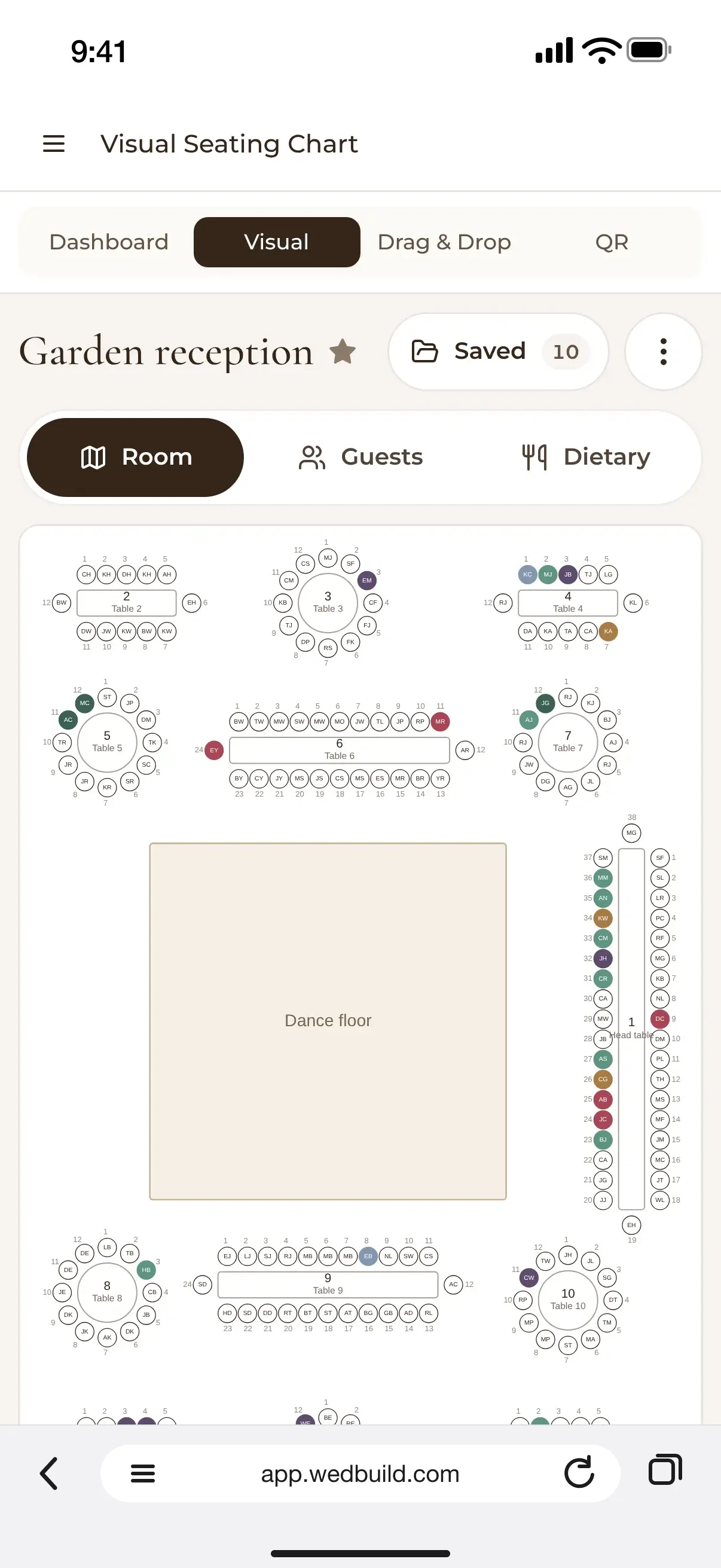
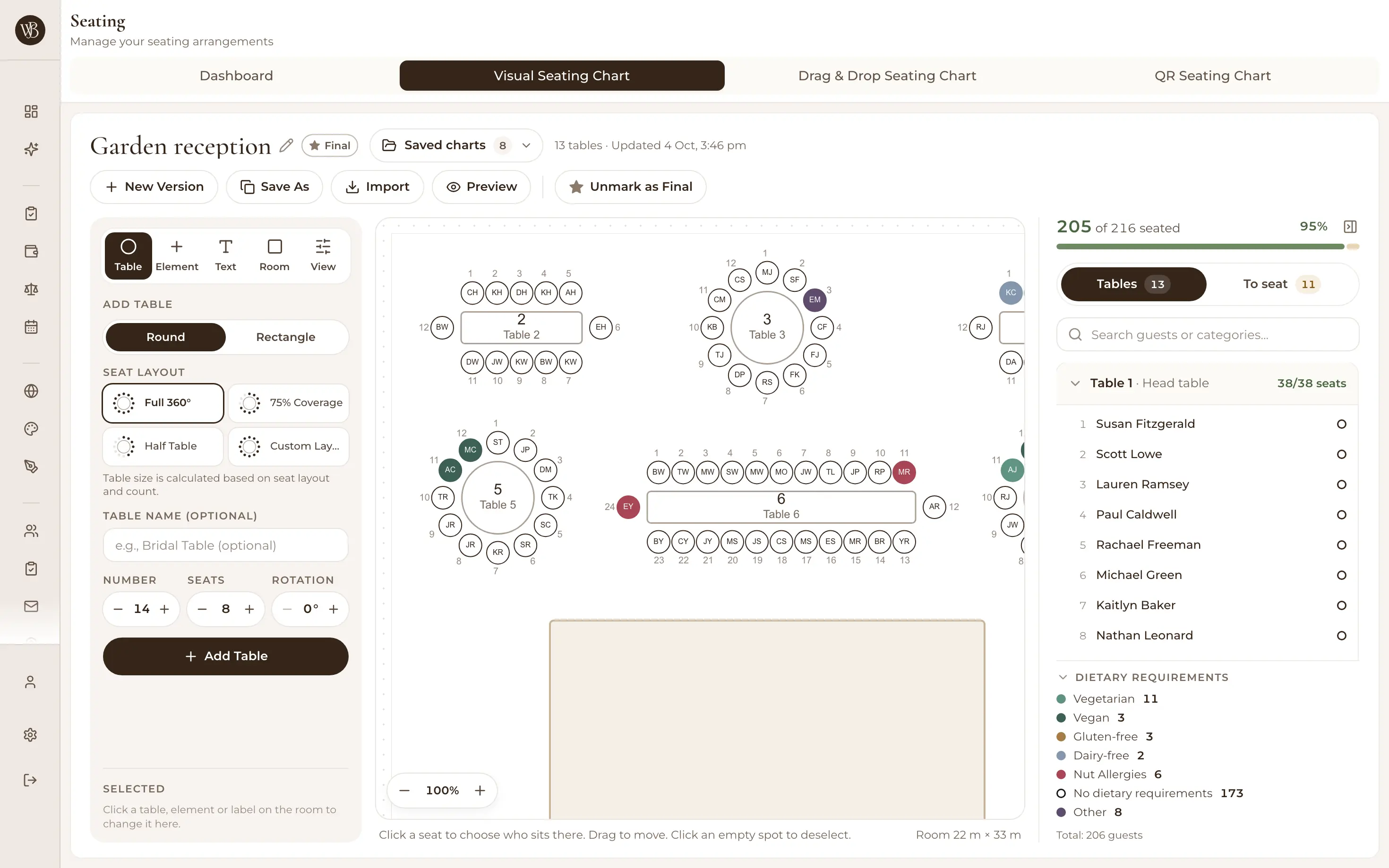
The visual room designer on a laptop: Garden reception with round and long tables, guests' initials on their seats, the head table's guest list and a dietary requirements summary

The room designer on a laptop, and the same plan on your phone.

Lay out the room, to the metre

Draw your venue from 4 to 200 metres a side, then add round or rectangle tables of 1 to 50 seats, the dance floor, bar, band or DJ, cake table and your own table. The planner works out the room's areas from it (near you, by the dance floor, somewhere quiet, near the entrance), so a guest who needs a quiet spot or an easy way out gets one.

  • ProVisual room designer and floor plan
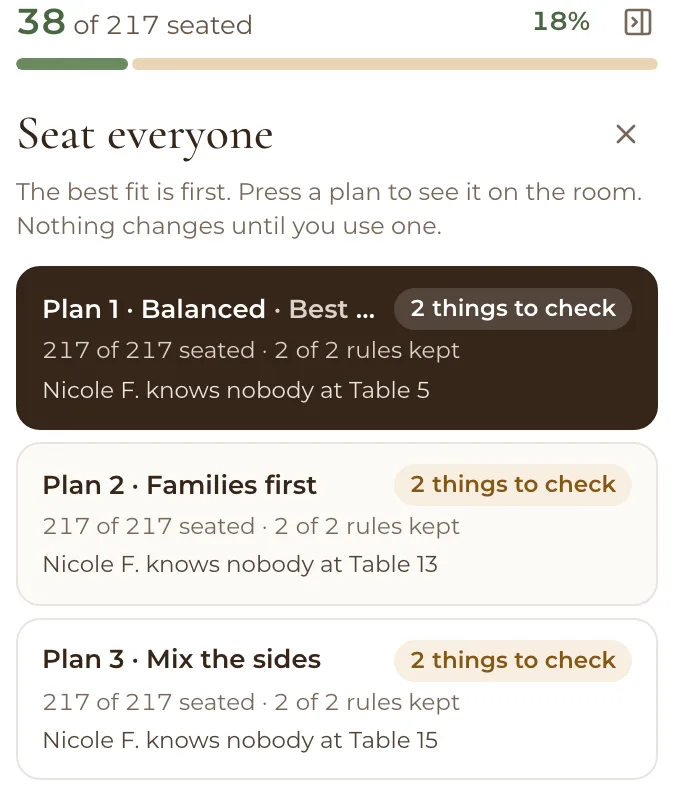
Seat everyone's three plans: Plan 1 Balanced, Plan 2 Families first and Plan 3 Mix the sides, each with 217 of 217 seated, 2 of 2 rules kept and 2 things to check
Three plans, best fit first
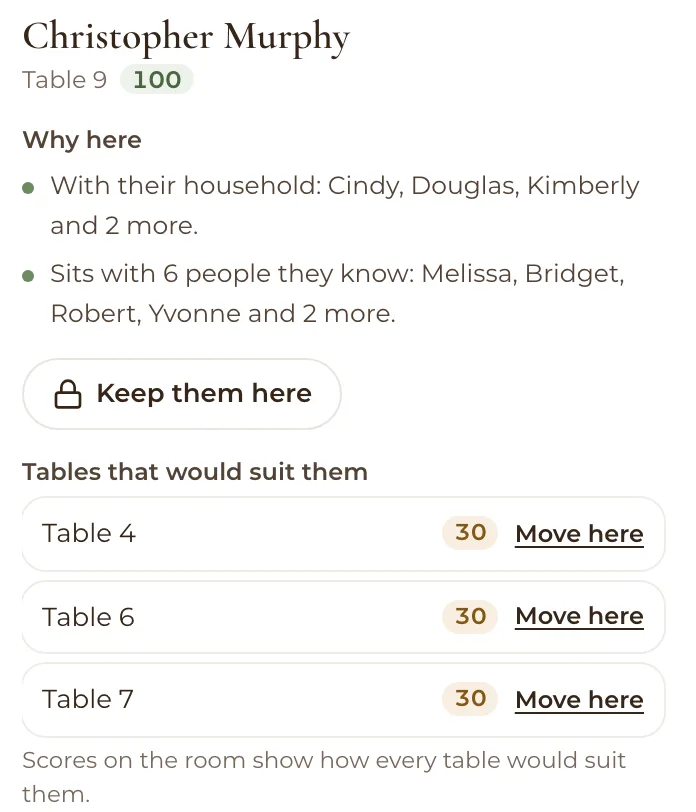
Christopher Murphy at Table 9, scored 100: why here, with their household and sitting with 6 people they know, a Keep them here button, and Tables 4, 6 and 7 that would also suit them
Tap anyone to see why they sit there

Seat everyone in one press

Smart Seating tries thousands of arrangements and offers three plans: Balanced, Families first and Mix the sides, best fit first. Each one names what's worth a look, like a guest who knows nobody at their table, and nothing changes until you choose Use this plan. Tap any guest to see why they sit where they do.

  • ProSmart Seating, free in your 7-day trial
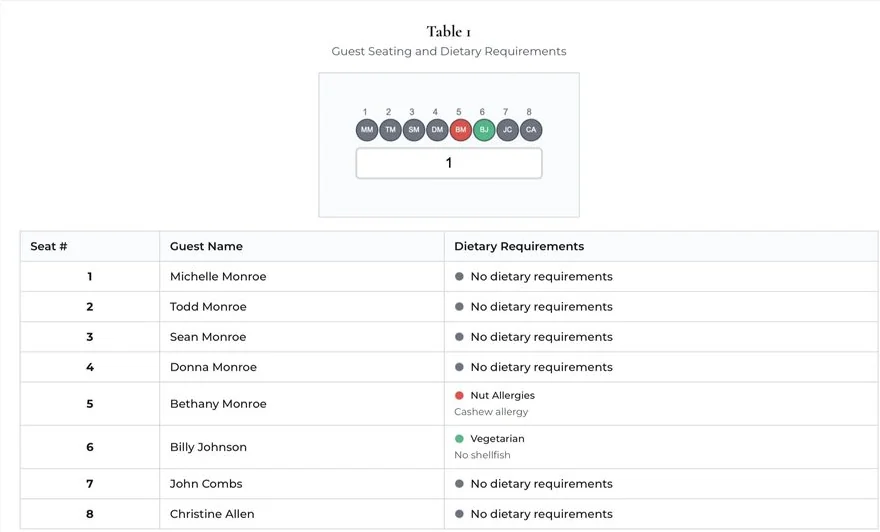
A printed table card for table 1: each seat with the guest's name and dietary requirements, such as a nut allergy and vegetarian

A table card ready for the caterer, and a QR sign for the door.

Print it, and hand it over

Print the room plan, a page for each table with its dietary needs, an A to Z list of names for the door and fold-over place cards (ten to an A4 page), on A4 or US Letter. Your venue gets a link with the final seating, meals by table and dietary needs, allergies first.

  • ProPrint table cards with dietary legends
“Visual seating chart was a lifesaver. Printed the dietaries straight for the caterer. 10/10.”
Bill & RachelAdelaide, SA, 122 guests

How it works

From names to tables in three steps.

  1. Bring in your guests

    Paste names into the free planner to try it, or import your guest list from a spreadsheet when you sign up. RSVPs keep it current.

  2. Set out your tables

    Start from a starter room or a simple list of tables, and choose how many seats each one has.

  3. Seat everyone, then fine-tune

    Press Seat everyone, pick the plan you like, and drag anyone you'd rather move. Then print it for your venue.

Which plan has it

Pay once, never a subscription.

  • Standard

    A$99once, for 2 years

    Drag and drop table plan, with saved versions

  • Pro

    A$199once, for 2 years

    Room designer, Smart Seating, table cards and Find My Seat

All of it is in your 7-day free Pro trial. No card needed. 14-day money-back guarantee on paid plans.

Compare every plan

Questions

Before you start your plan.

What is a wedding table plan?

It's the plan of who sits at which table at your reception, and often where each table stands in the room. Your venue and caterer use it to set the room, and your guests use it to find their seat. It's also called a seating plan or a seating chart.

How do I make a wedding table plan?

Start once most of your RSVPs are in. Seat the people closest to you first, then families, then friend groups, and put anyone who doesn't get on at different tables. In WedBuild's free planner, paste your guests, pick a room and press Seat everyone for me to see a first draft straight away.

Is the table plan maker free?

Yes, to try. WedBuild's planner runs in your browser with no account, but nothing in it is saved. Keeping a plan is part of WedBuild's paid plans: Standard, a one-time payment, has the drag and drop table plan with saved versions, and Pro adds the room designer, Smart Seating, printing and Find My Seat. Every new account gets every Pro tool free for 7 days, and the price page compares every plan.

When should I do the table plan?

Most couples start a few weeks before the day, once replies are mostly in, and finish when the venue asks for final numbers. If a late reply changes things after you've seated everyone, Smart Seating offers to fix the plan with the fewest moves.

Can I print my table plan for the venue?

Yes, with Pro. Print the room plan, a page for each table with its dietary needs, an A to Z list of names for the door and fold-over place cards, on A4 or US Letter. You can also send your venue a link with the final seating and meals by table, allergies first.

How many guests can it seat?

The free planner takes up to 500 names at once. In a WedBuild account, Standard and Pro have no guest limit, and tables in the room designer seat anywhere from 1 to 50 each.

Guides to go deeper

Read up, then plan.

Still deciding? Compare wedding planning apps in our guide to the best ones in Australia, WedBuild included.

Prefer the planner on a page of its own? Open the free seating chart maker.

A bride and groom kiss in the aisle as their guests throw confetti

Ready when you are

A table plan, without the late nights.

Start with your guest list today, and your plan is ready to seat when the yeses are in.

Every Pro tool and no guest limit, free for your first 7 days. No card needed.
Pay once if you upgrade, never a subscription.