Guest List & RSVPs
QR Codes on Wedding Invitations in Australia: Where to Link, What to Print and What to Say
A wedding invitation QR code should usually open the RSVP page, with the web address printed beside it. See where to place it and how to test it.
By Henry Schofield
· 7 min read
Photo by Katsia Jazwinska on Unsplash
A QR code on a wedding invitation should open the page guests need, usually the wedding website’s RSVP page, without competing with the names and date. Print the web address beside it, too.
What should a wedding invitation QR code link to?
The best destination depends on what guests need to do next. For an invitation, that is usually sending a reply. A map or photo upload page serves a different purpose, so it should not take the place of the RSVP link simply because it can.
The wedding website home page is best when guests need to read about the wedding before they reply. Guests then have one more step to take to reach the RSVP page. Make that route obvious.
The RSVP page is best when collecting replies is the main task. The watch-out is whether guests can also find the wedding details they need before deciding.
A photo upload page is best when the card asks guests to share photos. That is a different job from accepting an invitation. Keep the wording specific so guests do not scan expecting to RSVP.
A map is best when the immediate task is finding the venue. On an invitation, it should not displace the route guests need to confirm attendance.
Best QR code setup for each kind of wedding
Best for a big guest list
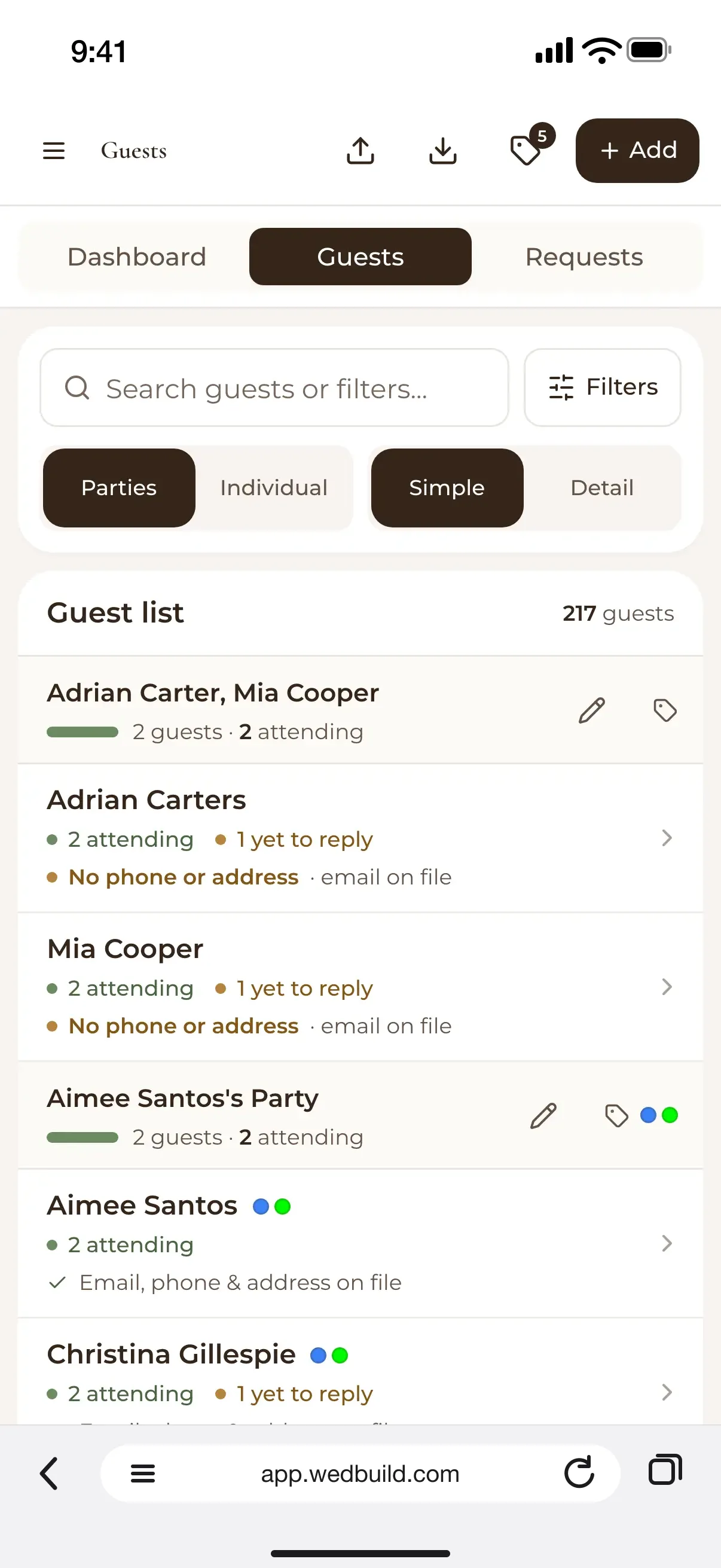
A code leading to an RSVP page connected to the guest list is the strongest fit. Replies and dietary requirements need to be kept together. When they sit in separate places, the planning job becomes reconciling records.
Best for older guests
A QR code with a short, typed web address beside it gives guests a choice. How old guests are says little about how keen they are to scan. The same fallback helps anyone who would rather type an address than point a camera at the card. Both ways in should feel like they belong on the card.
Best for a destination wedding
A wedding website home page is useful when guests need to read the details before replying. Keep the route from those details to the RSVP clear. A map can help with directions, but it cannot do the website’s whole job. The invitation should lead to the information guests need to make their decision.
Best for a short engagement
A code that opens the RSVP page takes guests straight to where they can reply. Pair it with wording that says exactly what to do. This is not the moment for a mysterious “Scan to discover” beside the code. Guests should know they are opening a reply page.
Where to put the QR code on the invitation
The front works if the code can sit apart from the names and date without crowding them. Putting it on the back keeps the main design clear, and guests can still find the way to reply on the invitation itself. A details card has room for the code beside the information guests need. Put the code where guests can most easily see what it is for.
Wherever you put the code, give it clear contrast and some empty space around it. Decoration should not crowd its edges. Print the short web address beside or directly under the code, where guests can find the alternative without turning the invitation into a puzzle. Let the paper proof, rather than the screen preview alone, guide the final decision.
What to write next to the QR code
The line beside the code should say where it goes or what guests can do there. “Scan here” leaves half the instruction unsaid. Match the wording to the page that actually opens, then use the tone that suits the invitation. These options run from formal to casual.
- Kindly scan to RSVP.
- Please scan to confirm your attendance.
- Please reply via the wedding website.
- Scan for wedding details and RSVP.
- Scan to RSVP and share dietary requirements.
- Ready to reply? Scan to RSVP.
- Joining the celebration? Scan to reply.
- Scan for the details, then RSVP.
Keep the typed web address separate from the invitation’s flourish. It is a working part of the card. Even the loveliest wording cannot help a guest who will not scan and has no other route to the page.
How to make and test a wedding QR code before you print
Start with the exact page guests should open, then use its address to create the QR code. A static code contains a fixed destination. A dynamic code uses a redirect, so the service that runs it can change where it leads while the printed square stays the same.
Before choosing a generator, check its terms for the type of code you need. There is no single price that applies to every code. The website plan and the QR code service are separate choices, so a wedding website price should not be treated as a QR generator price.
Before approving the print run, work through this checklist.
- Scan the code on an iPhone and an Android phone.
- Test from the printed proof.
- Check that the link opens on mobile data.
- Confirm that it opens the intended page and that the wording matches.
- Keep a short, typed web address under the code for guests who do not scan.
If the destination is the RSVP page, follow that route far enough to check that guests can reach the reply task.
Worked example: one invitation, one code, every RSVP in one place
This is an illustration. A couple uses WedBuild for their wedding website, online RSVP and guest list. Their printed invitation has a QR code on the back pointing to the website, with the line “Scan for wedding details and RSVP” and the typed web address underneath. The names and date take centre stage on the front.
From that website, guests reach the RSVP and provide their replies and dietary requirements. Those details stay together in the guest list, with no need for records in different places. The couple tests the code from the paper proof on iPhone and Android before printing. Guests who do not scan can use the printed address to reach the same site.
Where WedBuild fits in
The code points to a form in one app, the website lives in another, and the guest list sits in a spreadsheet. Replies and dietary needs can then drift apart. WedBuild addresses that split rather than treating the QR code as the whole solution.
WedBuild keeps the wedding website and online RSVP together. The code on the card can therefore open the same site that collects replies into the guest list. That connection is the useful part of the setup.
WedBuild’s free plan covers weddings up to 50 guests with the wedding website, online RSVP, guest list with import and export, checklist and event schedule, with no time limit. WedBuild’s Standard is A$99 and Pro A$199. Both are one-time payments with two years of access and no subscription.
Before you go
Frequently asked questions
Can your QR code open your wedding website’s RSVP page?
Yes. Use the address of the RSVP page as the code’s destination, then test that exact route from the printed proof. This suits invitations where the main request is to reply.
Can WedBuild keep online RSVPs and the guest list together?
Yes. WedBuild’s wedding website and online RSVP are on the same site, and replies go into the guest list.
How much does a QR code for a wedding cost?
The cost depends on the QR service and the type of code selected. Check the provider’s published terms to see how long the code can be used, as it may differ from how long the wedding website is available.
What if a guest will not scan the code?
Print a short web address beside or under it. Guests can type that address to open the page without scanning.

Written by
Henry Schofield
Co-founder, WedBuild
Henry is the co-founder of WedBuild and a chartered accountant who's spent his career helping Australian businesses get their numbers right. After his own wedding budget sprawled across three different spreadsheets, he built WedBuild's budget planner: designed by an accountant, for couples who'd rather not become one.