Wedding Planning
Wedding Planning Tools That Let You Pay Once and Keep Every Feature
Three no-subscription wedding apps compared by what one payment unlocks.
By Henry Schofield
· 10 min read
A wedding planning app does not need a monthly fee. WedBuild is free to start with optional one-time upgrades, while planning.wedding offers free basics and a one-time seating upgrade, and The Private Wedding App offers lifetime access for a single payment. The best fit depends on what that payment unlocks, how the features connect, and whether the business earns from helping couples plan or sending enquiries to vendors.
How wedding planning tools make money, and why it shapes what you see
A vendor-funded directory earns money from businesses paying to appear or from the enquiries and bookings they receive. Its planning tools help bring couples into that process. That is a different job from independent advice. Paid placement can make a vendor visible in a directory because they bought visibility, rather than because they match your budget, guest count or location. A couple planning a small wedding may only discover a minimum spend after making an enquiry.
A directory can help couples discover businesses they would not otherwise find, and those businesses may be suitable. But paid visibility and suitability are different filters. When the platform depends on vendor leads, generating contact is part of what its tools are built to do.
A subscription creates a different relationship with the couple. Monthly or annual fees continue whether planning is busy or paused, so the platform earns more when the paid relationship lasts longer. A wedding has an end date, though. Recurring access may still be worth buying, but its value depends on how long you need it and what you get during that time.
What a one-time payment model actually means for a couple
In the full-access version of one-time pricing, a single payment unlocks every feature permanently, without renewal or annual re-authorisation. There is no subscription clock running during quiet months. Couples can start early, take a break from planning and come back without paying for the time away. The platform earns from the purchase.
However, “one-time” can mean a permanent upgrade to one feature or permanent access to the whole platform, and free-to-start does not mean everything stays free. The meaningful questions are what the payment unlocks and whether another fee is needed for the jobs still ahead. A one-time tool may or may not cost less than a subscription used briefly.
The absence of a vendor marketplace is a separate distinction. A tool without paid vendor placements has no directory incentive to steer couples towards advertisers. That can make its purpose simpler, but it leaves a gap. Couples must find vendors independently if the tool only helps organise and compare them.
The tools that use a one-time model and what each one actually does
The no-subscription options available in 2026 differ in scope and price. WedBuild offers connected planning with optional paid upgrades, The Private Wedding App offers a whole-platform lifetime purchase, and planning.wedding offers free basics with a paid seating expansion. They are not interchangeable purchases. For Australian couples, currency, local relevance and the limits of each free tier belong in the comparison before a guest list goes in.
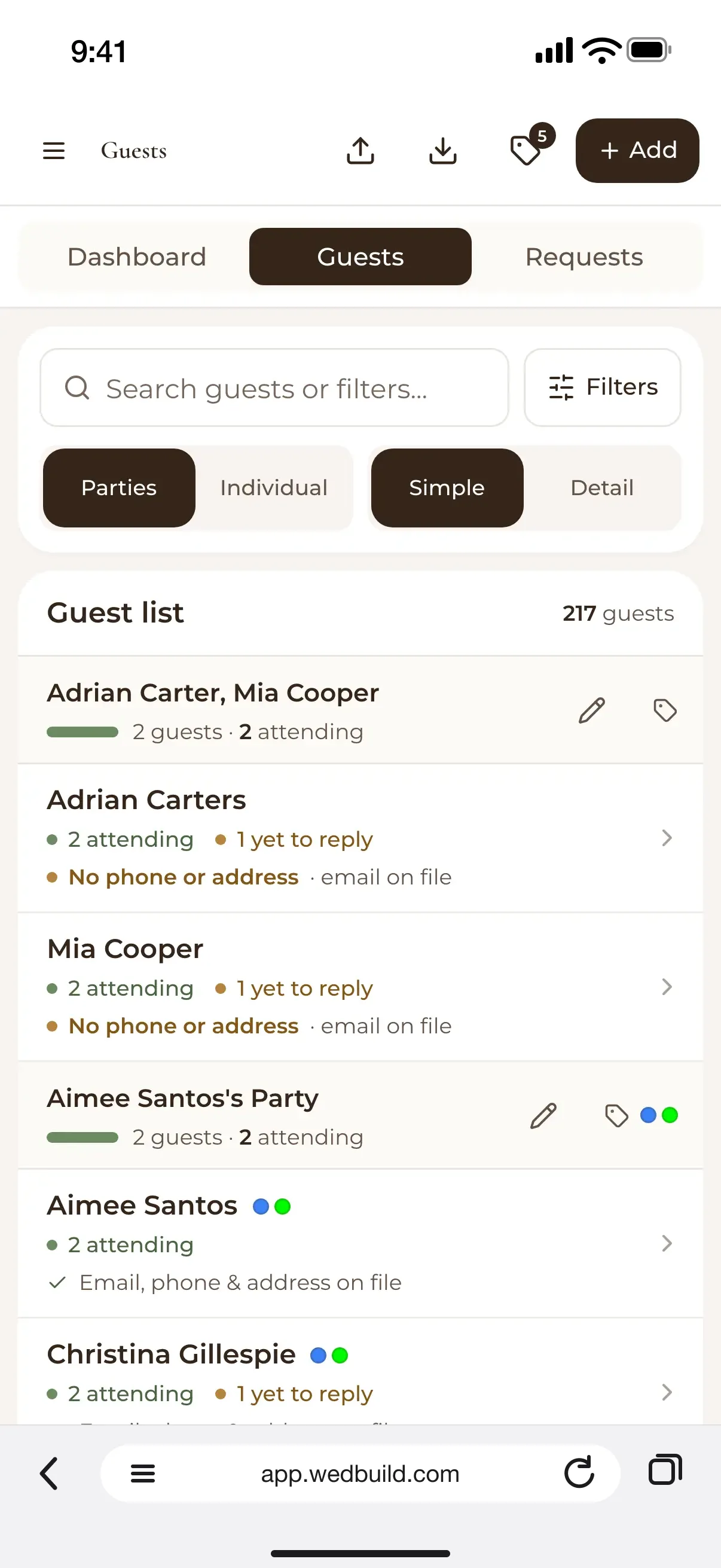
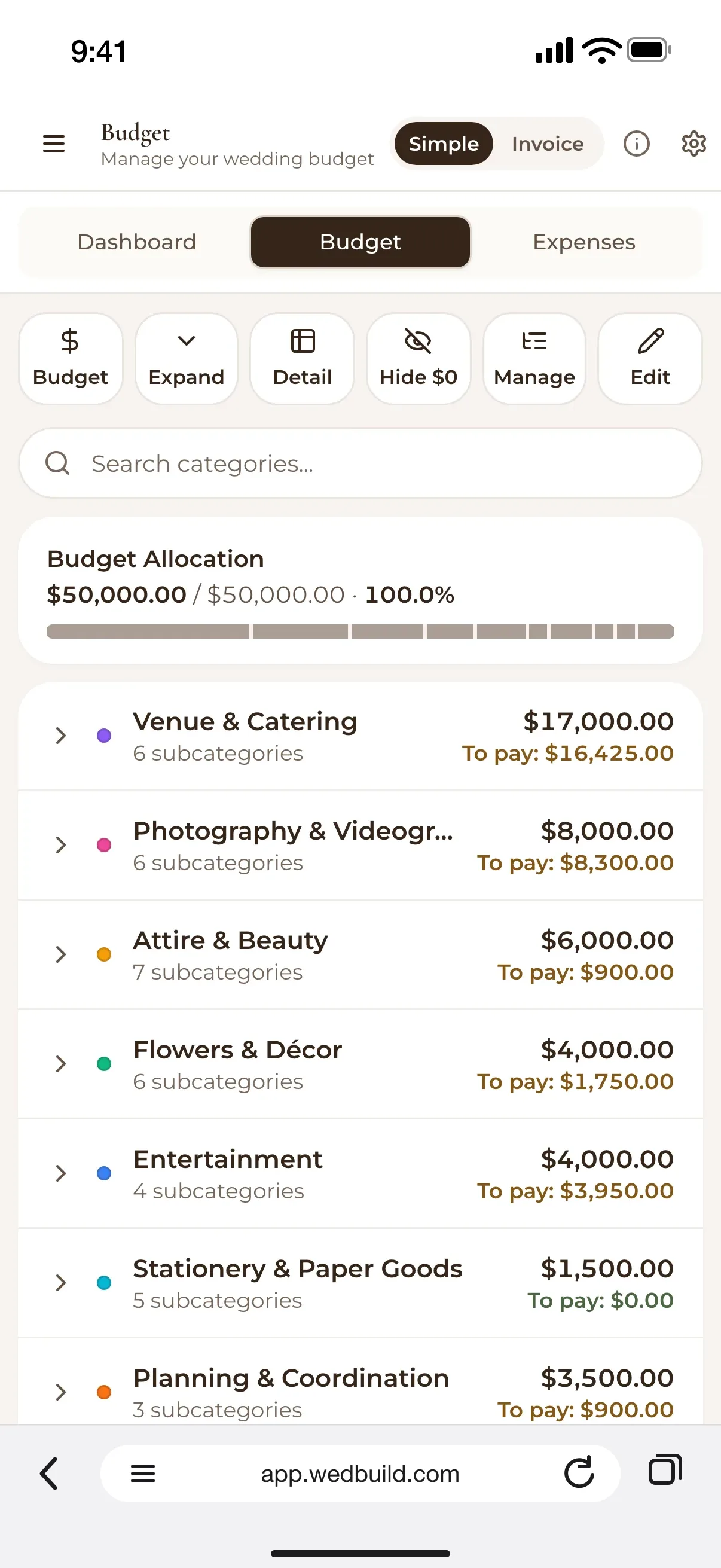
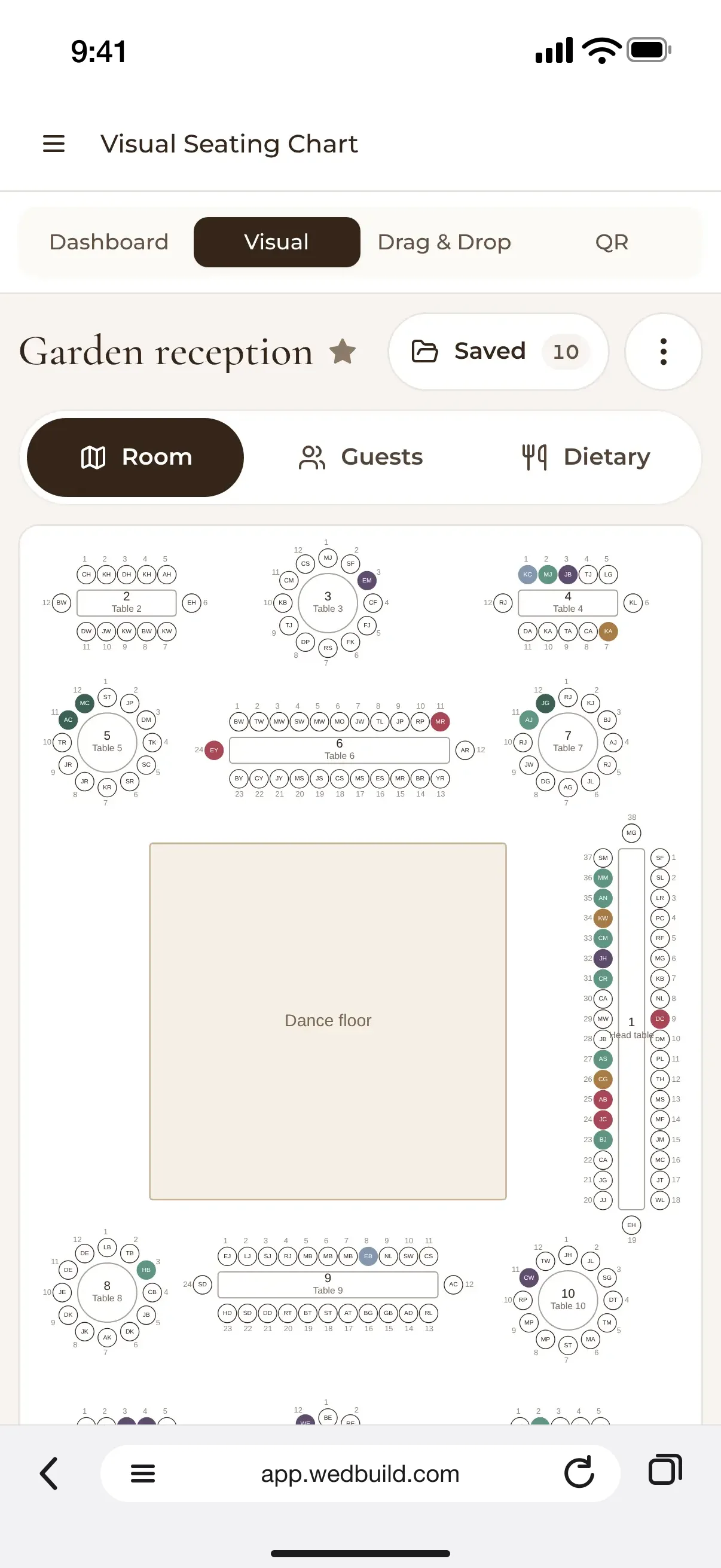
WedBuild is Australian-made, priced in AUD and free to start, with one-time paid plans. Its tools cover a wedding website, bulk guest import, multi-event RSVPs with structured dietary tracking, seating and a floor plan editor, invoice-level budgeting, vendor comparison, checklists, and card design with email campaigns. The website, guest list and seating share information. That makes it a fit for couples who want one connected planning system.
There are limits to that fit. The budget planner and seating chart are paid features, although every new couple gets seven days of Pro tools free with no card required. WedBuild has no vendor directory and no native mobile app, so couples find their own vendors and use the web app on a laptop or phone. It suits couples ready to organise their own plan, but not those who need vendor discovery inside the same service.
The Private Wedding App offers lifetime access to its whole platform for $189 once, or a subscription at $19.99/month, with those quoted prices in US dollars. It also offers pricing in 14 other local currencies including AUD. The lifetime purchase covers invitations, RSVPs, the guest list, seating, budget, checklist, vendors, moodboard, AI planner and guest photos, with no renewal. Its standout distinction is language support. Invitations are readable in 26 languages, with each guest choosing their own, making it a useful fit for international couples rather than a specifically Australian planning service.
planning.wedding takes a narrower paid-upgrade approach. Its free Basic plan includes a checklist, budget calculator, guest list, RSVP tracking and a seating editor for up to 5 tables, with no account required. With the $29 USD one-time Premium Project Upgrade, couples get unlimited tables, all the seating features and unlimited exports, including print-ready seating PDFs. The limits are clear, though, with no Australian-specific cost data or AUD pricing, and a free seating allowance that may not cover the full reception.
These options show why “pay once” needs a second question. For what? The cheapest charge is not the best comparison if it leaves the couple’s main job unfinished.
Why feature connection matters more than feature count
If RSVPs do not update the guest list, someone must reconcile them. If dietary requirements do not follow guests into the seating chart, someone must transfer those too. The finished chart then needs to become useful information for the kitchen, while guests still need a way to find their seats.
The practical test is whether one reply updates the next task. For example, in WedBuild, an RSVP updates the guest list, which feeds the seating chart, with dietary details following through. Table cards can include dietary legends, and Pro includes a QR-code “Find My Seat” feature. Guests can scan, search their name and see their table and the room layout.
On the wedding morning, if records are kept apart, someone may have to reconcile them under pressure, checking that the latest dietary response is in both the seating plan and the details for the kitchen. A connected chain removes that manual transfer and the need to remember which version has the final details, making fewer handoffs more useful than more features.
What Australian couples actually spend, and why a connected budget tracker changes the number
Australian weddings span a wide range of spending, from lean celebrations to much larger city events. Location influences the starting point, with Sydney and Melbourne towards the higher end, Brisbane and Queensland more moderate, and Adelaide and Perth among the better-value capitals. These are broad directions. The number of guests has the biggest effect on cost because so much of a wedding is charged per head. Changes to the list therefore affect more than the seating layout.
Yet an opening budget often records category allowances before commitments are known. A couple may enter an allowance for catering or photography before knowing the final inclusions, then receive invoices with service fees, overtime or extras missing from the original estimate. An average for a category cannot show the cost of the vendor, package and timing the couple has chosen. It can help set an initial allowance, but it cannot show the full cost of that choice.
Invoice-level tracking does a different job from estimating. It keeps track of actual invoices, deposits and payments, so couples can see how much they have agreed to spend against their first plan while they are still making choices. It gives the couple a chance to see an overrun before treating the remaining budget as money still available. A budget connected to the checklist timeline can also make timing choices clearer, since weekday and winter weddings can reduce vendor costs.
The vendor-finding gap and how to close it without a paid directory
A tool without a directory does leave you with work to do. You must find your own vendors before you can use the features that compare them. That is a genuine limitation, especially at the beginning. But finding a business and choosing between offers are different jobs, and a directory does not remove the second one. Once quotes arrive, the difficult part is working out whether they cover the same wedding.
To compare the quotes fairly, put each one in the same format. Start with the all-in price including tax and service fees, then record exactly what is delivered, including hours, headcount or items. Separate the extras, such as overtime, travel and additional edits, from the included work. Record the payment and cancellation schedule too. A photographer quoting different hours, a caterer separating service fees and a florist excluding delivery cannot be compared on the headline price alone.
Aim for two or three quotes per category. That gives you enough to see a market rate and spot an outlier without letting the search stall planning for months. Treat refusal to put a quote or date in writing as a warning, as well as pressure to decide on the same call. A price far below the going rate also needs an obvious explanation. None of those checks depends on where you first found the vendor.
WedBuild’s vendor comparison puts quotes couples have already found into the same format, so they can compare them without digging through an inbox of PDFs. It does not solve discovery, and should not be mistaken for doing so. The workable split is independent sourcing followed by like-for-like comparison, with the full price and terms visible before a choice is made.
How to pick the right pricing model for where you are in planning
Early in planning, from engagement to six months before the wedding, vendor discovery can be the biggest job. A directory has genuine value at that stage. For organising the plan, prioritise a free-to-start tool whose limits are clear before the guest list is locked. Check the seating-chart and guest-messaging paywalls before entering everyone’s details, because moving later means more work. Free access is useful only if you know where it ends.
From six to three months out, the active jobs shift towards budget tracking and guest management. A tool that tracks partial payments, actual invoices and dietary requirements does more of these jobs than a good-looking checklist alone. Replies are coming in, and couples need details they can trust for the first seating draft. This is when shared data starts earning its keep. The pricing decision should account for those working features alongside the ones that looked appealing when planning began.
In the final three months, the chain from RSVP to seating, kitchen information and day-of coordination becomes the strongest test. A one-time tool that connects those jobs without charging again when guest numbers change is a strong fit. Test the connections before committing to them. WedBuild’s seven-day Pro trial, with no card required, gives couples a way to try its paid tools.
A useful free plan should cover the guest list, RSVPs, wedding website and checklist, because those jobs run from engagement through to final numbers. It is fair to charge for seating and invoice-level budgeting if the free tier does its job until couples need those features. Couples deserve to know that boundary before entering their data.

Written by
Henry Schofield
Co-founder, WedBuild
Henry is the co-founder of WedBuild and a chartered accountant who's spent his career helping Australian businesses get their numbers right. After his own wedding budget sprawled across three different spreadsheets, he built WedBuild's budget planner: designed by an accountant, for couples who'd rather not become one.